


I am Having Problem Of "VCRUNTIME140_1.dll"
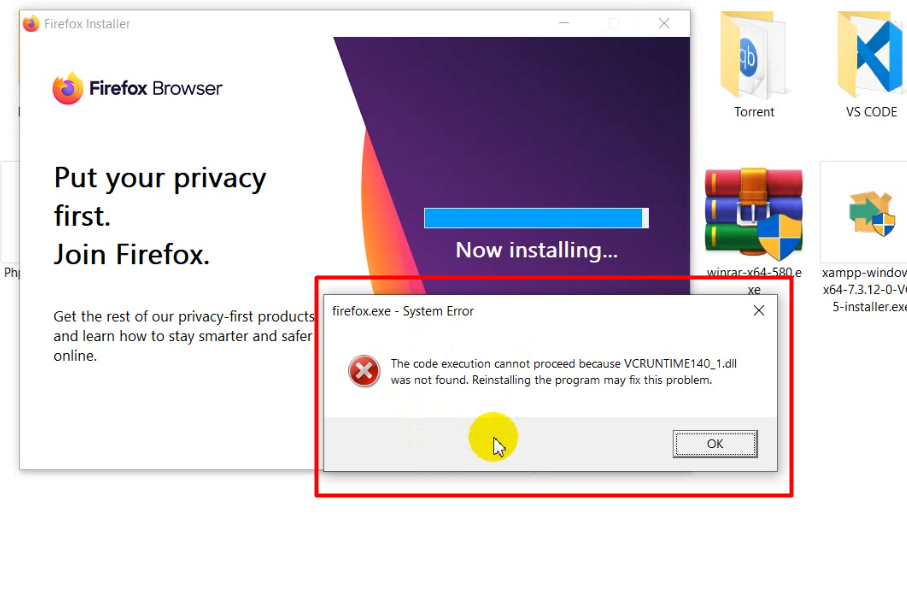
Hi, I was trying to install MYSQL but unfortunately its failed because I am using XAMPP. SO I cancelled the installations and removed all the SQL installed file which were installed in that mean time when installing SQL. After I restart my windows and try to open firefox and showing exactly same error popup and then I uninstall firefox and trying to resinstall it but I cannot. There showing that error notice. I also tried to renamed "prefs.js" but its not solved. Would kindly give me any suggestion or do you kindly solve it remotely please. I love the browser and using it since 2012. Thanks in advance
चुने गए समाधान
Looks you have removed a Visual C runtime library that Firefox needs.
You will have to reinstall this file, maybe from the recycle bin or from running a system file check via sfc.exe or from a Windows installation disk.
All Replies (2)
चयनित समाधान
Looks you have removed a Visual C runtime library that Firefox needs.
You will have to reinstall this file, maybe from the recycle bin or from running a system file check via sfc.exe or from a Windows installation disk.
Hi again! Thank you very much. now Firefox working.