


"Adobe Flash Player Settings" appears on page, unable to click "allow"- Help!

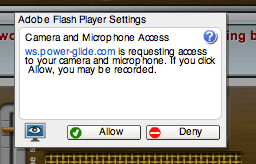
I'm on an language educational website that is powered by Adobe Flash. There is a feature on the site where you talk, and the website's microphone records you. Unfortunately, I get an "Adobe Flash Player Settings" module when opening it, and I'm unable to click the allow button-or anything on the screen. Help? Below is a screenshot.
http://i266.photobucket.com/albums/ii.../PastedGraphic-4-5.png
I'm on an language educational website that is powered by Adobe Flash. There is a feature on the site where you talk, and the website's microphone records you. Unfortunately, I get an "Adobe Flash Player Settings" module when opening it, and I'm unable to click the allow button-or anything on the screen. Help? Below is a screenshot.
[http://i266.photobucket.com/albums/ii247/Kab0000m/Josh/PastedGraphic-4-5.png]
כל התגובות (2)

Try changing your Flash Player privacy settings, as explained here:
http://www.macromedia.com/support/documentation/en/flashplayer/help/settings_manager.html
Try to change the global settings: