


How do I get rid of google search?

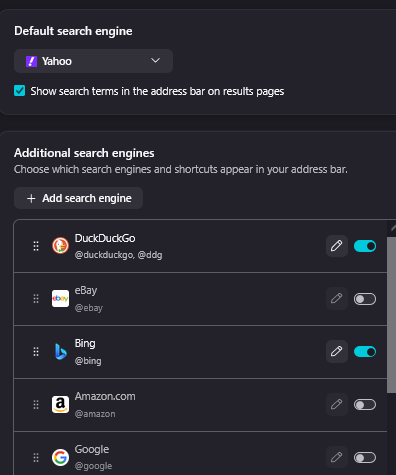
As of the last update, my search engine changed to google. I've disabled google search in tools and have yahoo listed as first and duck duck go as 2nd. Still, in the search bar, all I get is google as the search engine. I've tried all the 'fixes' I've found on the web and none have worked. There's not a way to get rid of google in the list Mozilla tools/search gives.
כל התגובות (3)

Mozilla tools ?
Do you mean > click on the three horizontal lines (Burger) then Settings > Search
I.e. there is no 'Tools' option
Also did you close Fx and Windows completely
Windows > Restart not Shut down
In settings/search. Yes, closing FF and when that didn't work, restart several times. Went back and tried maybe 4-5 more times, still nothing. No way to get rid of google. I have 2 start pages, protopage and start.me. It only happens on protopage. All was fine until the update 3-4 days ago. I was hoping today's update would fix the problem but no luck. On top of that now both start pages search engines are throwing in %20 after every word I type in search box AFTER I click enter. For example, I type in 'why is this happening? After clicking enter, it shows as why%20is%20this%20happening%3F.
Hi, check to see if you have a Google extension that's forcing its use. In my opinion, when you added the Yahoo search address, you probably had trouble typing it. Here it is: “https://fr.search.yahoo.com/search?q=%s.” Just enter that into the search URL field, and the problem will be solved.