


Join us to show up for other Firefox users 🦊. Earn fun badges and Mozilla swag vouchers! Find out more: https://mzl.la/askafox150

Windows 10 reached EOS (end of support) on October 14, 2025. If you are on Windows 10, see this article.

חיפוש בתמיכה

יש להימנע מהונאות תמיכה. לעולם לא נבקש ממך להתקשר או לשלוח הודעת טקסט למספר טלפון או לשתף מידע אישי. נא לדווח על כל פעילות חשודה באמצעות באפשרות ״דיווח על שימוש לרעה״.

מידע נוסף

FF fails to import bookmarks from MS Edge

  • 3 תגובות
  • 0 have this problem
  • 162 views
  • תגובה אחרונה מאת wxie
  • Open

To eliminate multiple problems (including disappearance of bookmarks) in desperation I uninstalled and cleared out all remnants of FF, then installed a new FF. Fortunately I had recently imported all the stuff FF more recently lost into MS Edge so I used the FF feature to import from MS Edge. However, every effort to import my bookmarks failed. So I used MS Edge's ability to create a HTML file of my bookmarks and then in FF used the "import a HTML file" feature to get them into FF. However, FF fails to recognize my bookmarks as bookmarks. It lists them in a "Favorites Bar" which cannot be strewn horizontally across the top of my screen as did my bookmarks in the past nor be viewed as bookmarks.

So HOW can I get FF to change the "Favorites" into Bookmarks?

In the tiny image I've uploaded, IF it can be read, the Bookmarks selections are "empty"
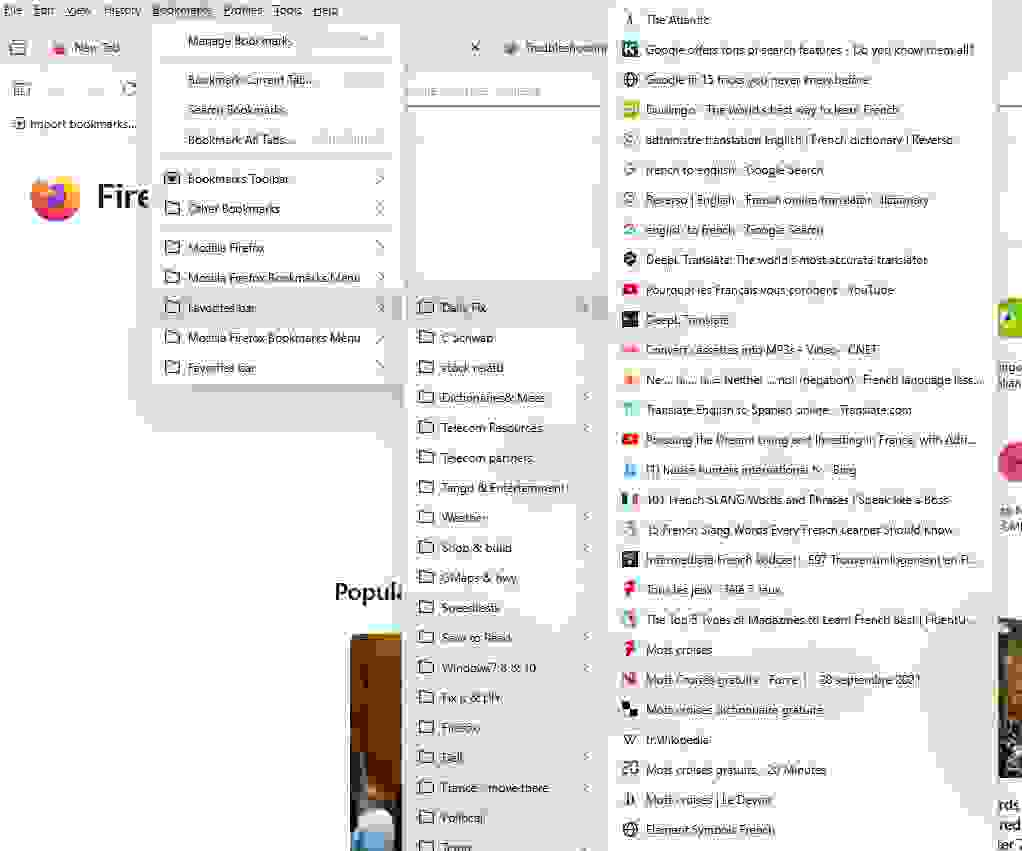
To eliminate multiple problems (including disappearance of bookmarks) in desperation I uninstalled and cleared out all remnants of FF, then installed a new FF. Fortunately I had recently imported all the stuff FF more recently lost into MS Edge so I used the FF feature to import from MS Edge. However, every effort to import my bookmarks failed. So I used MS Edge's ability to create a HTML file of my bookmarks and then in FF used the "import a HTML file" feature to get them into FF. However, FF fails to recognize my bookmarks as bookmarks. It lists them in a "Favorites Bar" which cannot be strewn horizontally across the top of my screen as did my bookmarks in the past nor be viewed as bookmarks. So HOW can I get FF to change the "Favorites" into Bookmarks? In the tiny image I've uploaded, IF it can be read, the Bookmarks selections are "empty"
צילומי מסך מצורפים

כל התגובות (3)

I think you are good at doing this already.

Have you tried to import your html file to a special bookmark folder - like imported from EG? https://support.mozilla.org/en-US/kb/import-bookmarks-and-other-data-microsoft-edge

PLEASE don't make me work more. I've spent 2 full days just trying to get FF working again. You asked a question that I obviously had not done. I looked at your link and reverted again to my gin bottle as I've emptied my bourbon bottle. I'm at my end of ......

Sorry for that.

פרסום שאלה

You must log in to your account to reply to posts. Please start a new question, if you do not have an account yet.