


Icon against 'subject line' in Thunderbird message list

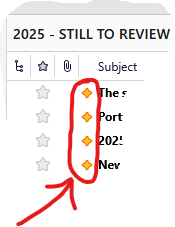
What does the icon that shows (for a while) against the SUBJECT line of messages indicate?
After some time, or perhaps following my general activity within the application or some other trigger, it seems to disappear for reasons I have yet to understand.
I attach a screen clip showing four of these icons ("2025 - STILL TO REVIEW" is one of my user-created folder names.)
Secondly, is the answer to the above question available already in online help for Thunderbird? If so, and since I haven't found it yet, I would be grateful to be pointed towards the relevant article. As a new user, I expect it would tell me other things that will be useful for me to learn!
I am using version 146.0.1 (64-bit).
פתרון נבחר
The yellow (golden?) diamond icon indicates "new message" since the last time the folder was opened https://support.mozilla.org/fr/kb/new-thunderbird-128-nebula
Read this answer in context 👍 1כל התגובות (2)

פתרון נבחר
The yellow (golden?) diamond icon indicates "new message" since the last time the folder was opened https://support.mozilla.org/fr/kb/new-thunderbird-128-nebula