Pin the Favourite Folders at the top of the folders list

Hi - is there a way to pin the Favourites Folders at the top of the email screen so that it doesn't disappear when you scroll down through the folders in the All Folders list below? This would then allow a user to drag an email from the inbox and move it to a particular folder way down the list and then do this again with the next email in the Inbox without having to scroll up and down like a nutter.
Thanks
כל התגובות (2)
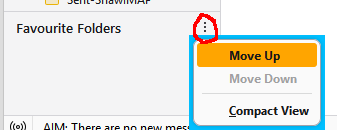
Thunderbird allocates the folders in the order they are assigned to folder pane. So, untick the all folders selection, then tick favorite folders, followed by all folders. The result will have favorites on top.
When you have multiple views in the Folder Pane, each view can be moved up or down by clicking the meatball (3-dot) icon shown in the attached picture.