


Windows 10 will reach EOS (end of support) on October 14, 2025. For more information, see this article.

חיפוש בתמיכה

יש להימנע מהונאות תמיכה. לעולם לא נבקש ממך להתקשר או לשלוח הודעת טקסט למספר טלפון או לשתף מידע אישי. נא לדווח על כל פעילות חשודה באמצעות באפשרות ״דיווח על שימוש לרעה״.

מידע נוסף

How can I force Firefox to accept a location as a URL and not a search request?

  • 1 תגובה
  • 0 have this problem
  • 186 views
  • תגובה אחרונה מאת cor-el

more options

macOS (and I assume Windows and Linux as well) supports local URL schemas. For instance, Apple supports the "applefeedback://" URL as a way to launch the macOS Feedback Assistance app.

If I have a link to this on a web page, or if I put it in a bookmark, Firefox will ask for confirmation and will then launch Feedback Assistant. This part works great.

But if I type that URL into the location bar, Firefox always sends it to my configured search engine. It doesn't recongize it as a valid URL. And in the popup list of suggestions, there is no option to just go there and not search for it. See the attached screen shot.

I don't want to disable location-bar searching altogether, because it is really useful, but I think there should be a way, on a case-by-case basis, to tell Firefox that I really want it to treat the entire text as a URL. The simplest approach is probably to have an extra row on the popup suggestion list that I can click on to open the text as a URL or produce an error if there is nothing in Firefox or the OS that can resolve it.

Hopefully this won't be too difficult to support. I think it would be extremely useful.
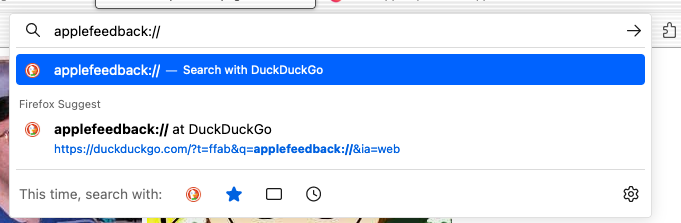
macOS (and I assume Windows and Linux as well) supports local URL schemas. For instance, Apple supports the "applefeedback://" URL as a way to launch the macOS Feedback Assistance app. If I have a link to this on a web page, or if I put it in a bookmark, Firefox will ask for confirmation and will then launch Feedback Assistant. This part works great. But if I type that URL into the location bar, Firefox always sends it to my configured search engine. It doesn't recongize it as a valid URL. And in the popup list of suggestions, there is no option to just go there and not search for it. See the attached screen shot. I don't want to disable location-bar searching altogether, because it is really useful, but I think there should be a way, on a case-by-case basis, to tell Firefox that I really want it to treat the entire text as a URL. The simplest approach is probably to have an extra row on the popup suggestion list that I can click on to open the text as a URL or produce an error if there is nothing in Firefox or the OS that can resolve it. Hopefully this won't be too difficult to support. I think it would be extremely useful.
צילומי מסך מצורפים

פתרון נבחר

Leave out the two // and only type the protocol and the colon and the URL.

Read this answer in context 👍 1

כל התגובות (1)

more options

פתרון נבחר

Leave out the two // and only type the protocol and the colon and the URL.