

אשכול זה נסגר והועבר לארכיון.
נא לשאול שאלה חדשה אם יש לך צורך בעזרה.

נעולה
Archived
How to enable Total Cookie Protection when in Custom mode?

In the Total Cookie Protection (TCP) article (https://blog.mozilla.org/security/2021/02/23/total-cookie-protection/) it says TCP is in Strict mode. I have my settings set to Custom with All third party cookies blocked, trackers blocked in all windows, cryptominers blocked, fingerprinters blocked. With these custom settings is TCP enabled for me? If not how do I enable it? Thanks in advance.
In the Total Cookie Protection (TCP) article (https://blog.mozilla.org/security/2021/02/23/total-cookie-protection/) it says TCP is in Strict mode. I have my settings set to Custom with All third party cookies blocked, trackers blocked in all windows, cryptominers blocked, fingerprinters blocked. With these custom settings is TCP enabled for me? If not how do I enable it? Thanks in advance.
כל התגובות (1)
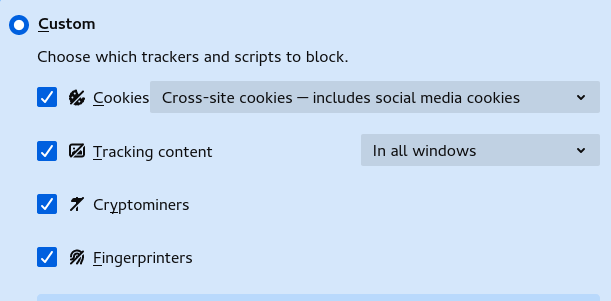
That would be this setting for the Cookies.
- Cross-site cookies — includes social media cookies
This question has been locked because the original author has deleted their account. While you can no longer post new replies, the existing content remains available for reference.