אשכול זה הועבר לארכיון.
נא לשאול שאלה חדשה אם יש לך צורך בעזרה.

נפתרה
Archived
I lost the bookmark star button from next to the address bar.
Similar to https://support.mozilla.org/en-US/questions/1173871. I accidentally clicked on remove this from address bar (thinking that would remove the bookmark).
I ran into https://support.mozilla.org/en-US/questions/1173871 with no solution but finally figured out how to add it back. But that thread was archived and closed. So I could not respond with a answer. Opening a new thread with to post the answer. Hoping that it will help others like myself who ran into this issue.
Similar to https://support.mozilla.org/en-US/questions/1173871. I accidentally clicked on remove this from address bar (thinking that would remove the bookmark).
I ran into https://support.mozilla.org/en-US/questions/1173871 with no solution but finally figured out how to add it back. But that thread was archived and closed. So I could not respond with a answer. Opening a new thread with to post the answer. Hoping that it will help others like myself who ran into this issue.
כל התגובות (1)
פתרון נבחר
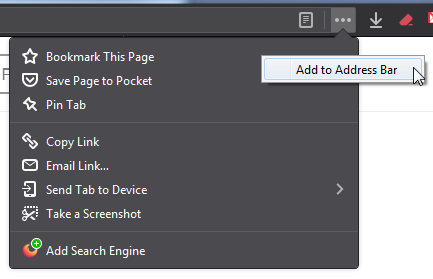
To restore the bookmarks star button in the address bar:
- Left-click on the three little dots ... in the address bar.
- Right-click on Bookmark This Page.
- Left-click on Add to Address Bar.
See the attached image for better understanding.