

אשכול זה הועבר לארכיון.
נא לשאול שאלה חדשה אם יש לך צורך בעזרה.

נפתרה
Archived
downloads
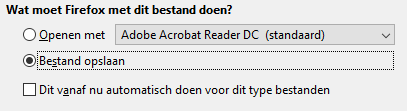
when i download a pdf file, i have the option to chose between opening with adobe and save as. when i want to save is it forgets that its a pdf file. in my downloads map i got a normal document with i cant open with adobe. i have this porblem with .pdf and .dwg
when i download a pdf file, i have the option to chose between opening with adobe and save as.
when i want to save is it forgets that its a pdf file.
in my downloads map i got a normal document with i cant open with adobe.
i have this porblem with .pdf and .dwg

כל התגובות (1)
פתרון נבחר
Hi mart.verkerk, there are a number of reasons this could happen, starting from the filename assigned by the site.
Does it help at all to set Windows to show all file extensions? This article has info on that setting:
https://www.bleepingcomputer.com/tutorials/how-to-show-file-extensions-in-windows/
If you save the same file on another browser, is there more to the file name after the part Firefox saves under? And if so, was there a blank space between the parts?