


question marks instead of content

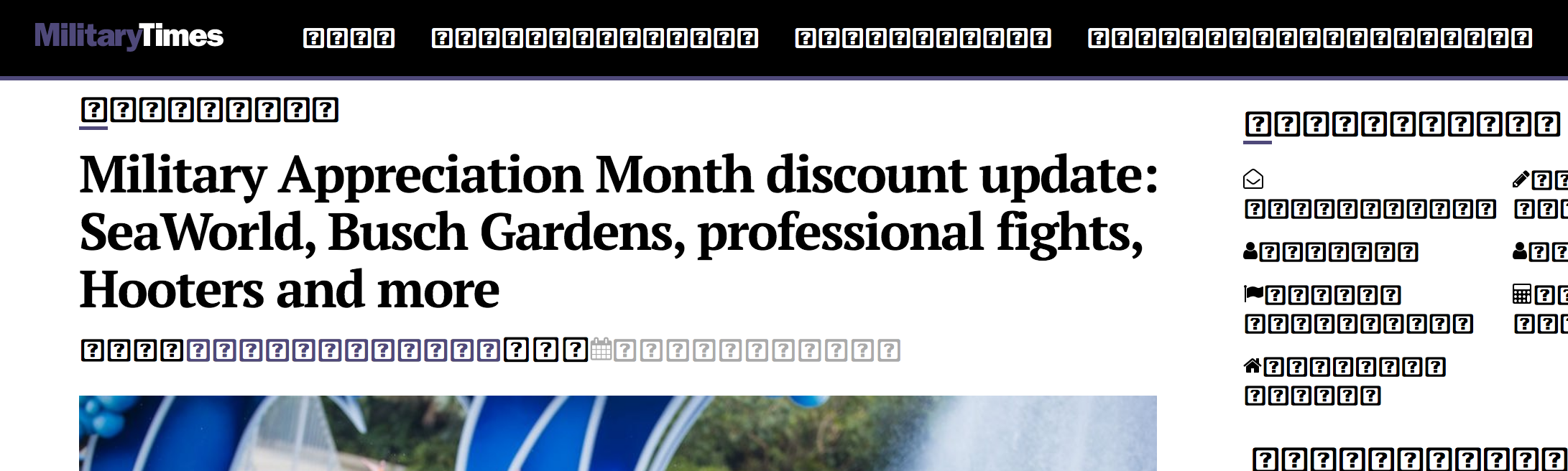
A few weeks ago, firefox for Mac os all a sudden started to showing a ton of squares for content, and it's really annoying. When I debug the site, I see the content there just fine. How can I fix this? This even happens in gmail sometimes. I don't use chrome for daily things, and want to keep it that way. I might switch to Safari again if it I can't get it fixed any ideas? I've looked all over, and nothing seems to help. It's actually getting worse.
פתרון נבחר
This can happen when Firefox has a problem to access locally installed fonts because of sandbox security issues. https://wiki.mozilla.org/Security/Sandbox
You can set this pref to 2 or 1 on the about:config page to lower the sandbox security setting.
security.sandbox.content.level = 1
close and restart Firefox to make the change effective.
If '1' still doesn't have effect then try '0' to disable the sandbox.
If this didn't work then undo/reverse the change and reset the pref via the right-click context menu to the default value.
Type about:config<enter> in the address bar. If a warning screen comes up, press the I Accept the Risk button. At the top of the screen is a search bar.
Read this answer in context 👍 0כל התגובות (4)
Please see screenshot of the symbols.

פתרון נבחר
This can happen when Firefox has a problem to access locally installed fonts because of sandbox security issues. https://wiki.mozilla.org/Security/Sandbox
You can set this pref to 2 or 1 on the about:config page to lower the sandbox security setting.
security.sandbox.content.level = 1
close and restart Firefox to make the change effective.
If '1' still doesn't have effect then try '0' to disable the sandbox.
If this didn't work then undo/reverse the change and reset the pref via the right-click context menu to the default value.
Type about:config<enter> in the address bar. If a warning screen comes up, press the I Accept the Risk button. At the top of the screen is a search bar.
Thanks 0 worked.
Glad to help. Safe Surfing.