Cannot enter GMail credentials

Hi,
After installing Thunderbird, I tried to configure my GMail account and when it ask to sign in to google, nothing is happening when I click the "Next" button. Nothing is happening when I try to click "More Options as well.
Any ideas ?
Thanks in advance.
פתרון נבחר
You should find this was fixed in version 52.1.0. https://www.mozilla.org/en-US/thunderbird/52.1.0/releasenotes/
If you agree, please click the "problem solved" button"
Read this answer in context 👍 5כל התגובות (2)
פתרון נבחר
You should find this was fixed in version 52.1.0. https://www.mozilla.org/en-US/thunderbird/52.1.0/releasenotes/
If you agree, please click the "problem solved" button"
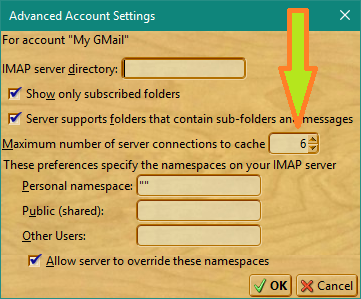
I have been using Thunderbird for a number of years, with two of six accounts being Gmail. I recently was unable to access one of the two via TBIRD. A test email to both accounts showed both accessible via webmail but only the one making it to my TBird inbox, with the other causing a Google-looking error message about a password problem. I tried all the solutions on the Google side and on the TBird side with no change. Then I happened to discover a setting in the “problem” account settings on TBird:
The max server connections was at 5 (I have 6 active in TBird), so I changed it to “6".
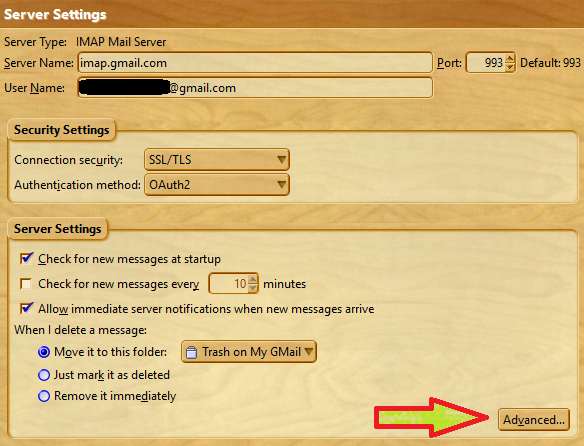
Go to Tools/Account Settings, open the server settings for the problem account, and in the “Server Settings” area select “Advanced” to access this setting.
All I can say is that the problem has disappeared and not returned.