


why no .json files

My powerbook died. It was backed up. I want to get my bookmarks back. In the backup am I looking for a .json file of some kind? There are none. Is there any way to get the bookmarks back?
כל התגובות (5)
Did you find the Firefox profile folder in that backup?
- ~/Library/Application Support/Firefox/Profiles/<profile>/
In Mac OS X v10.7 and later, the ~/Library folder is a hidden folder.
- http://kb.mozillazine.org/Show_hidden_files_and_folders#Mac_OS_X
- http://kb.mozillazine.org/Profile_folder_-_Firefox
Current releases use compressed .jsonlz4 backups in the bookmarkbackups folder.
In my back-up here:
~/Library/Application Support/Firefox/Profiles/<profile>/
There's nothing there.....
I'm confused because I'm trying to get them off of a timemachine harddrive so I'm not sure if those methods you suggested will work.
Is there at least the "~/Library/Application Support/Firefox/" folder in the time machine bavkup?
Note that you can use this button to go to the current Firefox profile folder:
- Help -> Troubleshooting Information -> Profile Directory:
Windows: Show Folder; Linux: Open Directory; Mac: Show in Finder - http://kb.mozillazine.org/Profile_folder_-_Firefox
No...but there is not a folder in Application Support Labled FileForx
Library/ApplicationSupport/Mozilla Folder which has an Extensions folder inside.
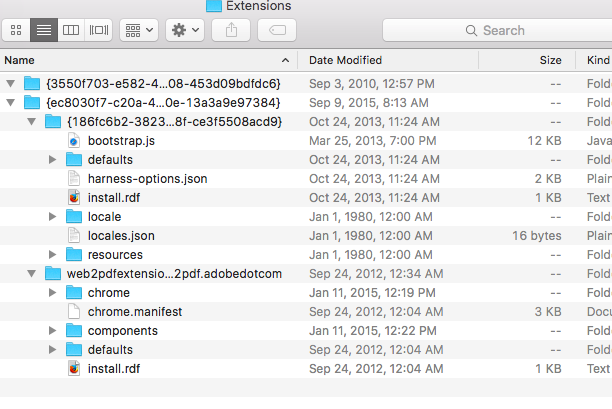
The extensions folder in that location stored extensions that are installed globally (time stamp is from past year's September), so these items may no longer be of use. If the Firefox folder is missing in that location then you personal data that is stored in the profile folder is lost.