


Grayed out box in Firefox

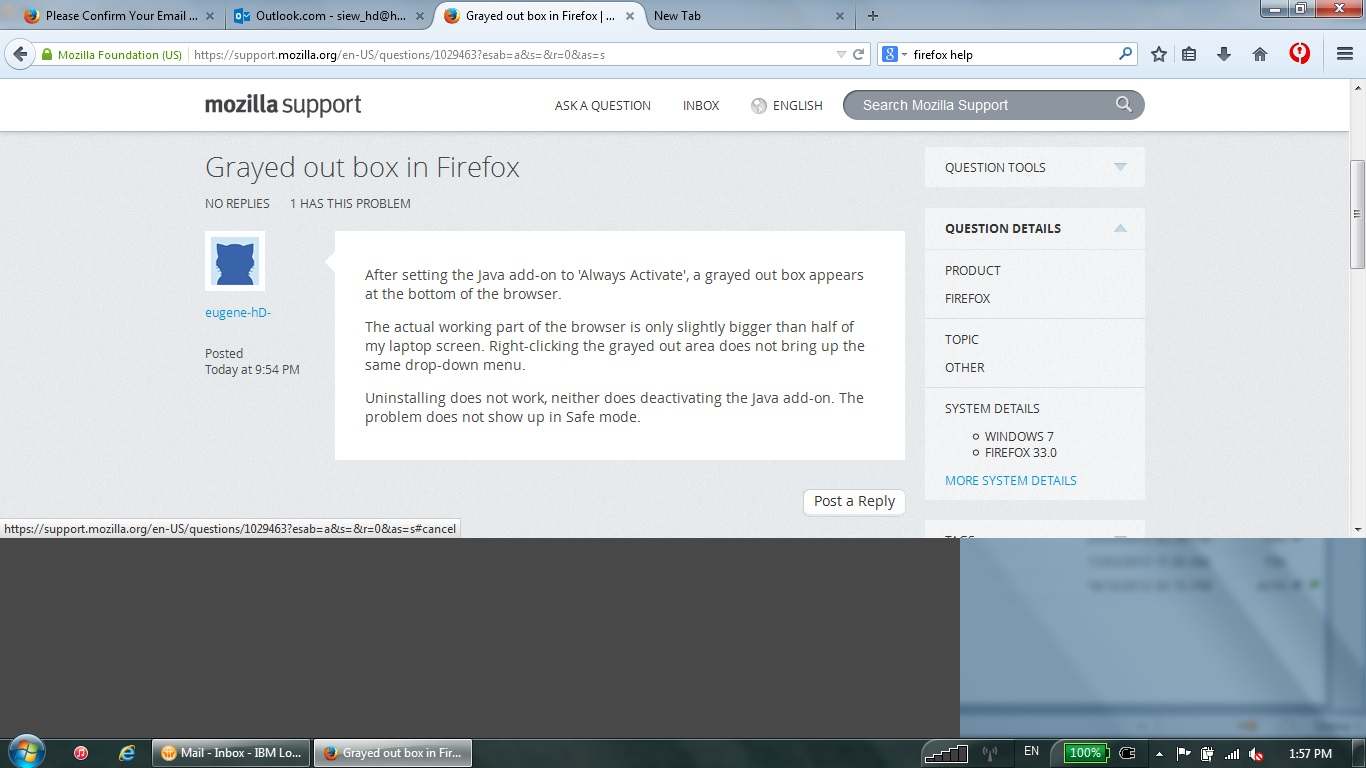
After setting the Java add-on to 'Always Activate', a grayed out box appears at the bottom of the browser.
The actual working part of the browser is only slightly bigger than half of my laptop screen. Right-clicking the grayed out area does not bring up the same drop-down menu.
Uninstalling does not work, neither does deactivating the Java add-on. The problem does not show up in Safe mode.
כל התגובות (2)
This is what I see right now. With each tab I open, the darker gray box slowly extends till it covers the entire section.
The left-hand section is actually the effects from the 'show desktop' button in Windows 7 (the little rectangle at the far right of the taskbar). What is showing in that blurred image is my last opened window.
Start Firefox in Safe Mode to check if one of the extensions (Firefox/Tools > Add-ons > Extensions) or if hardware acceleration is causing the problem.
- Switch to the DEFAULT theme: Firefox/Tools > Add-ons > Appearance
- Do NOT click the Reset button on the Safe Mode start window