


A new tab of http://secure.xsrving.com is opened on its own

Every time I put the mouse's cursor on the search line in thepiratebay.se, a new tab opens with the site listed in the topic. Got any idea why is this happening?
כל התגובות (3)
Hello,
Could be an ad popup, check your popup settings under:
- Tools (or
 ) > Options > Content
You can also try using adblocking extensions such as Adblock Plus.
If that doesn't help. try Firefox Safe Mode to see if the problem goes away. Firefox Safe Mode is a troubleshooting mode that turns off some settings, disables most add-ons (extensions and themes).
If Firefox is open, you can restart in Firefox Safe Mode from the Help menu:
- Click the menu button , click Help
 and select Restart with Add-ons Disabled.
If Firefox is not running, you can start Firefox in Safe Mode as follows:
- On Windows: Hold the Shift key when you open the Firefox desktop or Start menu shortcut.
When the Firefox Safe Mode window appears, select "Start in Safe Mode".
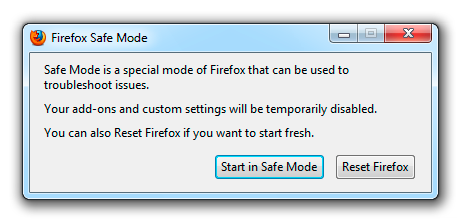
If the issue is not present in Firefox Safe Mode, your problem is probably caused by an extension, and you need to figure out which one. Please follow the Troubleshoot extensions, themes and hardware acceleration issues to solve common Firefox problems article to find the cause.
To exit Firefox Safe Mode, just close Firefox and wait a few seconds before opening Firefox for normal use again.
When you figure out what's causing your issues, please let us know. It might help others with the same problem.
The problem was indeed with an extension. To be more specific it was with the extension called "Social Reviver 4.4". This extension lets you customize Facebook to look the way you like (and restore many old features) and disabling it solved the problem and its affect on Facebook still remains so its a win situation.
Glad you found it. Please mark your post as the solution so that others who face a similar situation can quickly find what they need to do.