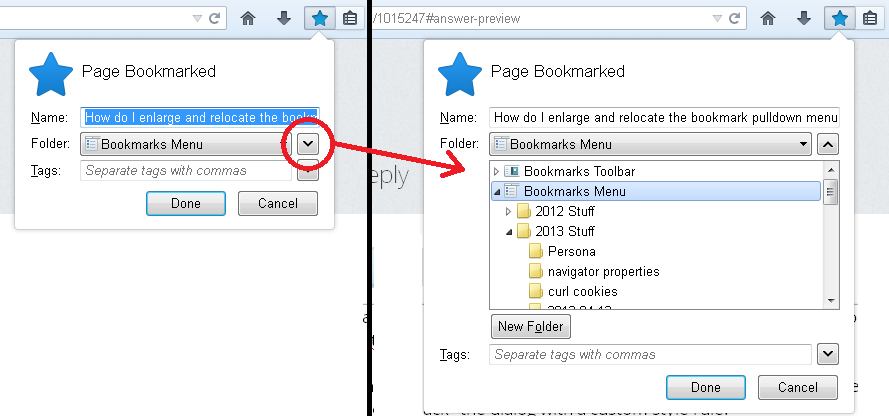
How do I enlarge and relocate the bookmark pulldown menu?

I have many bookmark folders and sub folders. When I'm trying to select one the bookmark pulldown window is much too small. I need to make it bigger and if possible, make it a scalable window. The scalable window option would be much appreciated, Mozilla :)
כל התגובות (1)
Hmm, I'm not sure which pulldown window you mean. Could you clarify?
(1) Bookmarks Menu on the classic menu bar (File, Edit, View)
(2) Bookmarks toolbar button (drop-down list)
(3) Bookmarks folder list when adding a new bookmark (e.g., Ctrl+d) or editing an existing bookmark? (See screen shot)
Note: not sure it's useful, but if you have a widescreen monitor, you might consider using the Bookmarks Sidebar (Ctrl+b). Unlike a drop-down menu, it doesn't close if you accidentally moving your mouse away for a second.