


My send tab disappeared & I can no longer send e mails. Cannot locate composition folder which was a suggestion in your help section.

Please advise how to get send tab back so I can send emails.
Zaɓi Mafita
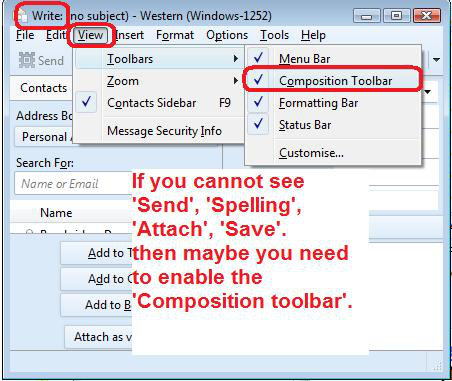
First you need to get the 'Menu Bar' toolbar visible again.
- Open a new Write message window
- Press the 'Alt' key on your keyboard.
This will show the 'Menu Bar', but now you have to make it permanent.
- 'View' > 'Toolbars' > select 'Menu bar'
This will now allow you to use the instructions I stated in first comment to get the 'Composition Toolbar' enabled again.
All Replies (3)
re :Cannot locate composition folder
It's not a folder. It's a toolbar called 'Composition Toolbar'.
In Write window where you compose an email: Can you see the top Menu Bar that has 'File', 'Edit', 'View'...etc ? If yes: 'View' > 'Toolbars' > select 'Composition Toolbar' See image below
In where I compose emails there is no menu at all. Just who you are sending to subject & my email address. No place at all I can click for anything except body text & width what ever they are for.
Zaɓi Mafita
First you need to get the 'Menu Bar' toolbar visible again.
- Open a new Write message window
- Press the 'Alt' key on your keyboard.
This will show the 'Menu Bar', but now you have to make it permanent.
- 'View' > 'Toolbars' > select 'Menu bar'
This will now allow you to use the instructions I stated in first comment to get the 'Composition Toolbar' enabled again.
This question has been locked because the original author has deleted their account. While you can no longer post new replies, the existing content remains available for reference.