FF22: no orange box, so neither options nor add-ons. No bars are shown. Help?

Today I updated from FF 16.2 to the latest version. But now FF misses the orange box in the left corner above. Neither does it shown any bars. With no navigation bar I cannot even type an url. Without the orange box and/or bars I cannot reach my add-ons, my bookmarks, nothing. I cannot even see itf I really have downloaded a proper update, as the help function and about are missing as well. This new FF turns out to be an empty browser. My Dell laptop uses WinXPPro. I deinstalled FF several times, and reinstalled. To no avail. I tried to get my previous version, 16.2, back, but it's gone. It may all be due to an add-on, but as I can't reach these I cannot test this and/or disable them. Getting desperate, as I hate IE. Help, please.
Ñemoĩporã poravopyre
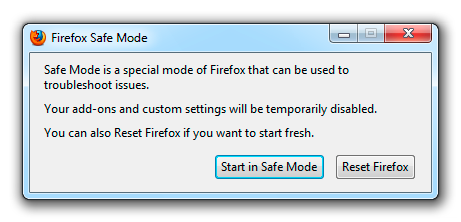
hello Beatasmb, please try holding the shift-key while firefox is launching and in the upcoming dialog box choose to reset the browser...
Emoñe’ẽ ko mbohavái ejeregua reheve 👍 1Opaite Mbohovái (1)
Ñemoĩporã poravopyre
hello Beatasmb, please try holding the shift-key while firefox is launching and in the upcoming dialog box choose to reset the browser...