


Want an Extension to appear in the toolbar (Awesome Screen Shot)

I had Awesome Screen Shot on my navigation toolbar. With a new update of my system (windows?) it no longer appears. How can I get the Awesome Screen Shot button to re-appear on my navigation toolbar? (It was next to the "home" button before).

Ñemoĩporã poravopyre
Maybe double-check that you have the awesome screenshot extension installed? You can download it again from here - https://addons.mozilla.org/en-US/firefox/addon/awesome-screenshot-capture-/
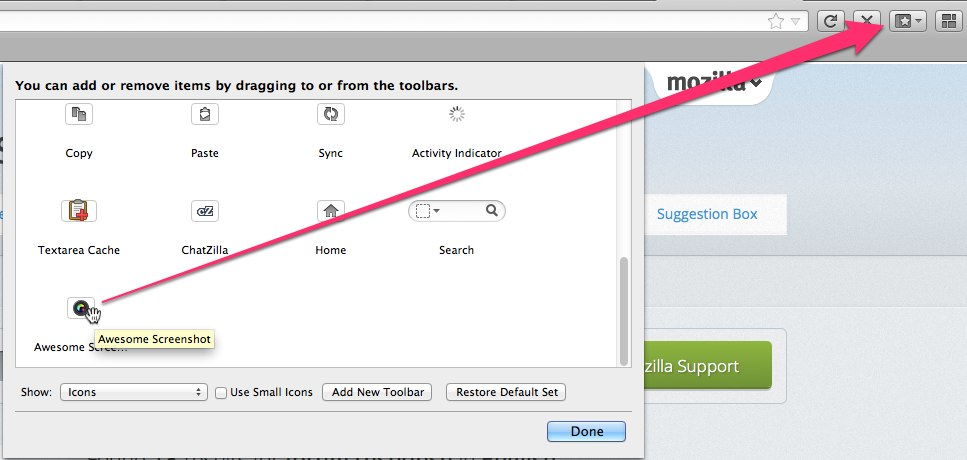
I have it installed. I had to scroll way down to the bottom of the customize window to find the button (see screenshot).
Opaite Mbohovái (4)
You can do that by customizing the toolbar. Just right-click on it and choose customize. More info here - Customize Firefox controls, buttons and toolbars
Thanks for the suggestion, but it doesn't help. By following your suggestion I have the ability to add certain icons, but not the Awesome Screen Shot extension.
Any other ideas?
Ñemoĩporã poravopyre
Maybe double-check that you have the awesome screenshot extension installed? You can download it again from here - https://addons.mozilla.org/en-US/firefox/addon/awesome-screenshot-capture-/
I have it installed. I had to scroll way down to the bottom of the customize window to find the button (see screenshot).
You know it was installed already but I took your suggestion, deleted it and RE installed it and it works! So thanks for the suggestion. I'm back in business.