


When I click on "Choose", then select the down arrow, only 5 of my folders are displayed. How do I see the other folders so I can save the bookmark where I choose.
I'm using Windows XP, Mozilla Firefox 3.6.13. I used to be able to select any of my folders when saving a bookmark. Now it only lets me choose from 5 (always the same 5). What's going on?

Ñemoĩporã poravopyre
Could be a problem with the file places.sqlite that stores the bookmarks and the history. Read the following carefully. Make a copy of your places.sqlite to avoid losing all of your bookmarks.
See: http://kb.mozillazine.org/Locked_or_damaged_places.sqlite
Moambuepyre Helper7677 rupive
Opaite Mbohovái (5)
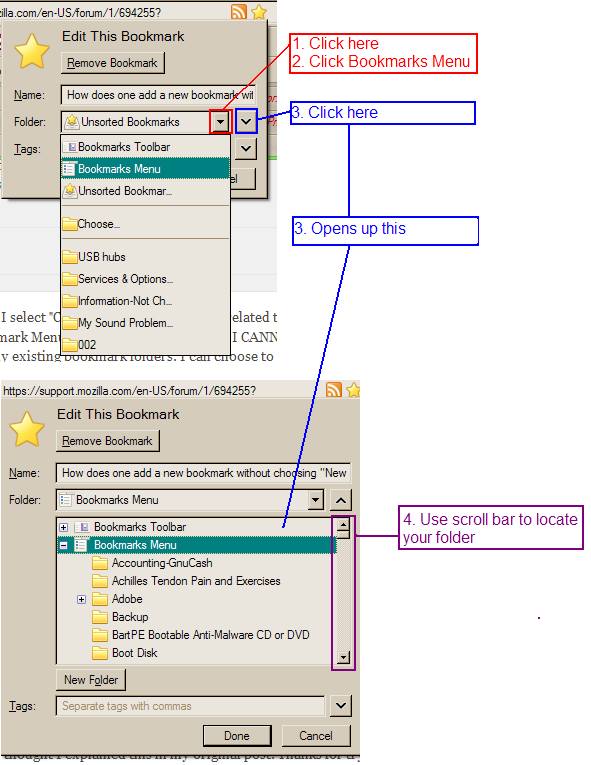
Does the first image below help? "BkMk_AddToExistingFolder.png"
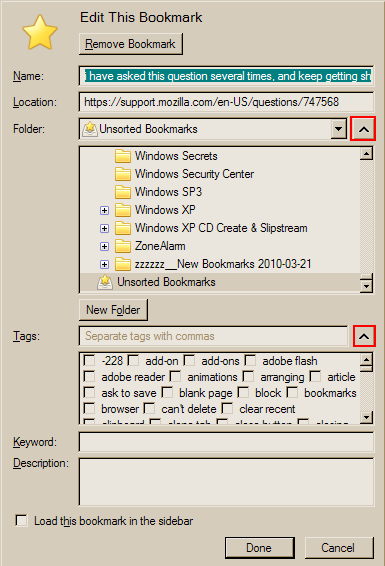
You can also look at the add-on "Add Bookmark Here 2" which will give you a much larger dialog window (see image below "AddBookmarkHere2-A.png")
- Add Bookmark Here 2: https://addons.mozilla.org/en-US/firefox/addon/add-bookmark-here-%C2%B2/
Other issues that need your attention
The information submitted with your question indicates that you have out of date plugins with known security and stability issues that should be updated. To see the plugins submitted with your question, click "More system details..." to the right of your original question post. You can also see your plugins from the Firefox menu, Tools > Add-ons > Plugins.
- Adobe PDF Plug-In For Firefox and Netscape 8.2.5
- Very old version. You may want to un-install old version before installing new version
- New Adobe Reader X (version 10) with Protected Mode was released 2010-11-19
- See: http://www.securityweek.com/adobe-releases-acrobat-reader-x-protected-mode
- Security update to versions 9.x and Reader X (ver. 10) released 2011-02-08
- Next Generation Java Plug-in 1.6.0_19 for Mozilla browsers
- 4 updates behind
- Check your plugin versions: http://www.mozilla.com/en-US/plugincheck/
- Note: plugin check page does not have information on all plugin versions
- Update Adobe Reader (PDF plugin):
- From within your existing Adobe Reader (if you have it already installed):
- Open the Adobe Reader program from your Programs list
- Click Help > Check for Updates
- Follow the prompts for updating
- If this method works for you, skip the "Download complete installer" section below and proceed to "After the installation" below
- Download complete installer (if you do NOT have Adobe Reader installed):
- Use the links below to avoid getting the troublesome "getplus" Adobe Download Manager and other "extras" you may not want
- Use Firefox to download and SAVE the installer to your hard drive from the appropriate link below
- Click "Save to File"; save to your Desktop (so you can find it)
- After download completes, close Firefox
- Click the installer you just downloaded and allow the install to continue
- Note: Vista and Win7 users may need to right-click the installer and choose "Run as Administrator"
- Download link: ftp://ftp.adobe.com/pub/adobe/reader/
- Choose your OS
- Choose the latest #.x version (example 9.x, for version 9)
- Choose the highest number version listed
- NOTE: 10.x is the new Adobe Reader X (Windows and Mac only as of this posting)
- Choose your language
- Download the file, SAVE it to your hard drive, when complete, close Firefox, click on the installer you just downloaded and let it install.
- Windows: choose the .exe file; Mac: choose the .dmg file
- Using either of the links below will force you to install the "getPlus" Adobe Download Manager. Also be sure to uncheck the McAfee Scanner if you do not want the link forcibly installed on your desktop
- Also see Download link': http://get.adobe.com/reader/otherversions/
- Also see: https://support.mozilla.com/en-US/kb/Using+the+Adobe+Reader+plugin+with+Firefox (do not use the link on this page for downloading; you may get the troublesome "getplus" Adobe Download Manager (Adobe DLM) and other "extras")
- After the installation, start Firefox and check your version again.
- From within your existing Adobe Reader (if you have it already installed):
- Update the Java plugin to the latest version.
- Download site: http://www.oracle.com/technetwork/java/javase/downloads/index.html (Java Platform: Download JRE)
- Also see "Manual Update" in this article to update from the Java Control Panel in Windows Control Panel: http://support.mozilla.com/en-US/kb/Using+the+Java+plugin+with+Firefox#Updates
- Removing old versions (if needed): http://www.java.com/en/download/faq/remove_olderversions.xml
- Remove multiple Java Console extensions (if needed): http://kb.mozillazine.org
- Java Test: http://www.java.com/en/download/help/testvm.xml
My plugins are up to date. Problem is not resolved. Also I noticed that the "New Folder" option is grayed out so it is unavailable when saving a bookmark.
Ñemoĩporã poravopyre
Could be a problem with the file places.sqlite that stores the bookmarks and the history. Read the following carefully. Make a copy of your places.sqlite to avoid losing all of your bookmarks.
See: http://kb.mozillazine.org/Locked_or_damaged_places.sqlite
Moambuepyre Helper7677 rupive
I renamed all the places.sqlite files, restarted Firefox and it works fine now. Thanks.
You are welcome. Glad I could help.
Please mark the question as solved with my answer. Thanks.