Windows 10 reached EOS (end of support) on October 14, 2025. For more information, see this article.

Eheka Pytyvõha

Emboyke pytyvõha apovai. Ndorojeruremo’ãi ehenói térã eñe’ẽmondóvo pumbyrýpe ha emoherakuãvo marandu nemba’etéva. Emombe’u tembiapo imarãkuaáva ko “Marandu iñañáva” rupive.

Kuaave

Problem: Bookmark sync only works in one direction

  • 1 Mbohovái
  • 3 oguereko ko apañuãi
  • 37 Hecha
  • Mbohovái ipaháva the-edmeister

jeporavorãve

I have 2 computer, computer A has vista and computer B is a netbook with XP. The problem is that the bookmark sycn only works in one direction.

For example: both my computer has the same book marks (previously sync with X-mark which is now disabled). I decided to do some clean up on computer B. If Y sync computer A, nothing happens, but when I sync computer B, all the cleanup I made has been undone since computer A override all the changes I made to B.

In other words, the changes I made to B can never be applied to A.

I have 2 computer, computer A has vista and computer B is a netbook with XP. The problem is that the bookmark sycn only works in one direction. For example: both my computer has the same book marks (previously sync with X-mark which is now disabled). I decided to do some clean up on computer B. If Y sync computer A, nothing happens, but when I sync computer B, all the cleanup I made has been undone since computer A override all the changes I made to B. In other words, the changes I made to B can never be applied to A.

Opaite Mbohovái (1)

jeporavorãve

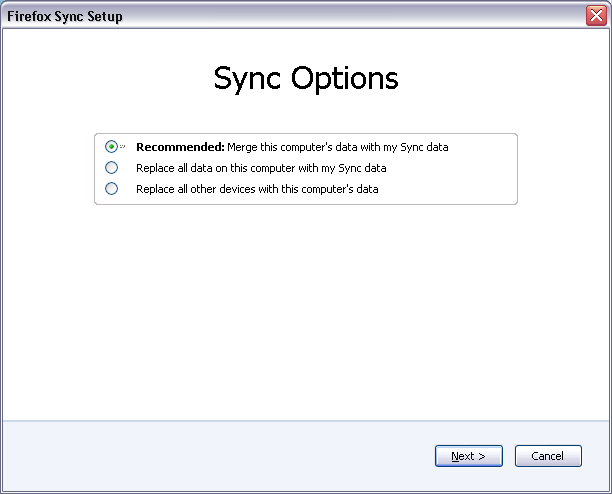
When you're doing a "clean-up" like that you need to use Reset Sync in Tools > Options > Sync - Current Account = Manage Account and use the Replace all other devices with this computer's data option. See the attached screenshot - use the third option.