


Unable to write the email to the mailbox

I've been using Thunderbird on Windows 10 since last year sometime. Currently I'm on version 151.0.1.
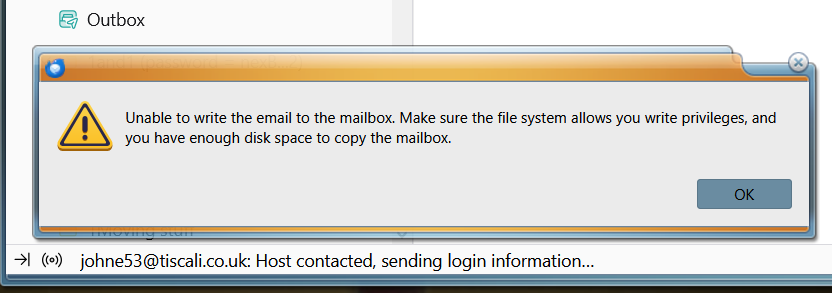
I've 4 x mailboxes here and since yesterday, 3 of them show me an unusual message when checking for emails. I tried attaching a screenshot but although the screenshot uploaded, I couldn't find a way to insert it here. But the message says Unable to write the email to the mailbox and asks me to check if I've write privileges (which I have) and to cheek the available disk space.(currently 101GB free).
The message is happening 2 or 3 times each day and lasts for about half an hour, then everything works fine again. Has anyone else seen this??
Opaite Mbohovái (22)
Thanks again for all that info and I'll go through it all tomorrow. In the meantime I figured out that the main problem was caused in that Advanced dialog because the setting called Use fixed width font for plain text messages was selected in the newly created profile. That was causing fonts in my Sent emails to keep getting converted to monospace which just looked weird so I unchecked it which improved things massively.
Ed said
johne53 said
Ed said
johne53 said
A few posts ago I showed a message I see saying No message found.Try R. click that Inbox > Properties > click 'Repair folder' button, then R. click that Inbox > Compact.
That does fix the problem Ed but I'm having to do it almost on a daily basis. Is there no way it can be fixed in the software? I'm sure I never needed to do it previously with Thunderbird.
Honestly, I don't know why. Profile corruption? May be best to try a new profile (https://support.mozilla.org/en-US/kb/profile-manager-create-and-remove-thunderbird-profiles).
Actually, I used to see one of two problems which are possibly the same bug. They both occurred if I tried to open a message in its conversation. One issue was the one I mentioned above (No message found) and the other was that Thunderbird would display a list of conversation emails but they were from some completely different conversation and not related to the email I originally selected.
Sadly, creating a new profile hasn't fixed the problem (at least, not the 2nd problem...). It worked for about a fortnight but I've just seen the "wrong conversation" issue with the new profile :-(
Repairing the folder and then compacting does fix it so could there be an option in Settings so that repairing and compacting could get done automatically occasionally? (or at each launch?)