when i clik 'show bookmarks' how can i remove the bookmark sidebar tools column

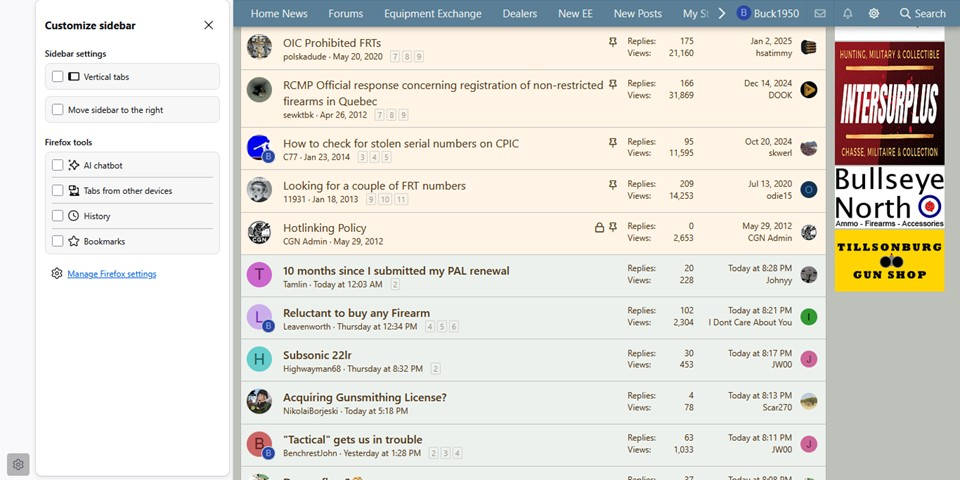
Until recently (like last week-ish) My Bookmarks Sidebar ONLY showed bookmarks. NOW, within the past few days the "bookmarks tools column" has been added to the screen-view. I have removed the 'tools' but the 'blank column' remains and takes up noticeable space on my laptop screen. How can I remove that 'column' ? Was this caused by a recent firefox update OR a win-365 'auto-update' ? Attached pic of screen - Here at the LEFT side is the 'blank column' with the 'settings Gear' at the bottom of the column. That is the column I want to 'Remove'.
Ñemoĩporã poravopyre
Back again - SOLVED - After about of an hour of trying "Cliks" I found in settings the "Show bookmarks toolbar" and UN-checked that box.
Emoñe’ẽ ko mbohavái ejeregua reheve 👍 0Opaite Mbohovái (3)
Ñemoĩporã poravopyre
Back again - SOLVED - After about of an hour of trying "Cliks" I found in settings the "Show bookmarks toolbar" and UN-checked that box.
Hi,
Thanks for getting back in this thread to udpate us. I've marked your answer as the solution and moved your question to desktop (it was filed under Firefox for Android previously).

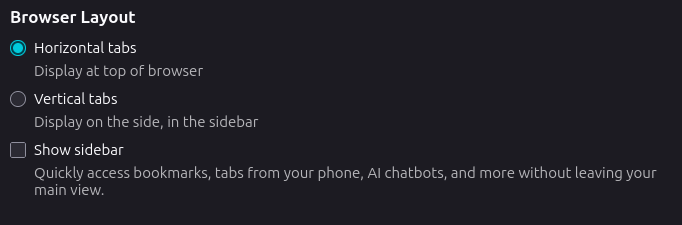
The solution is found in Settings >> General >> Browser Layout >> Uncheck "Show Sidebar". Your Sidebar will still show, but not the blank space to the left of it.