


Unable to sign in to a Gmail account after upgrading Thunderbird to version 128.9.2esr

Hello everyone,
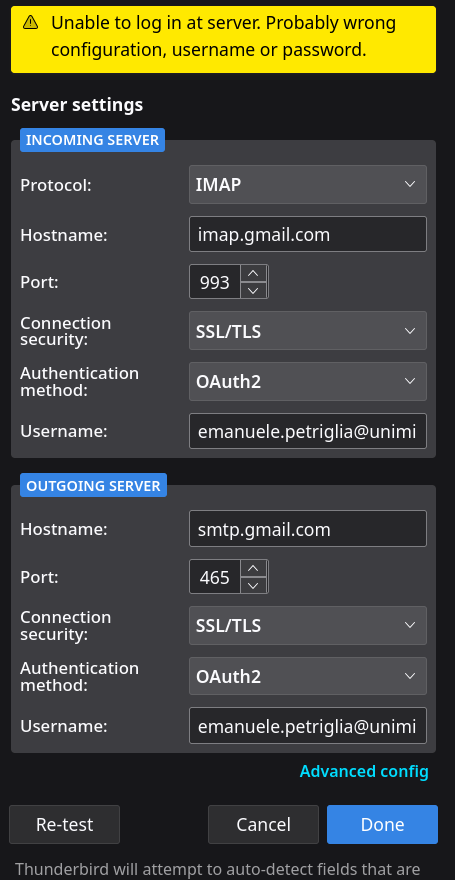
I have a Thunderbird instance with some mail accounts, two of them have the address @campus.unimib.it and @unimib.it. They are really GMail accounts, only the domain is customized by my university. After upgrading Thunderbird to version 128.9.2esr (on Fedora Linux), the first time I started the application, it couldn't log on to the @unimib.it account, but it could log on to the @campus.unimib.it account. This was strange: I removed the @unimib.it account and tried to add it as a new account, but Thunbderbird could not connect. At the same time it can connect to @campus.unimib.it with the same settings. I have attached a screenshot of the problem, what could be the problem? Thunderbird does not show any informative output.
Thank you in advance, Have a great day!
Opaite Mbohovái (4)
Usa la configurazione manuale -> https://support.mozilla.org/it/kb/configurazione-manuale-account
Se si tratta di un account Gmail standard leggi anche qui -> https://support.mozilla.org/it/kb/thunderbird-gmail
Se invece la gestione è personalizzata chiedi all'amministratore
Ovviamente parto dal presupposto che stai usando la versione di Thunderbird sviluppata da Mozilla. Le versioni pacchettizate dalle distribuzioni possono essere differenti.
Ciao, ho riprovato più volte ma non sono riuscito. Uso la versione di Thunderbird pacchettizata da Fedora, non ho idea se sia la stessa di Mozilla o se ci sono dei cambiamenti. Però fino alla versione precedente tutto funzionava (e ancora adesso funziona con l'altro account universitario @campus.unimib.it che è comunque Gmail, ma non l'altro @unimib.it) :/
La versione di Mozilla è qui -> https://www.thunderbird.net/it/thunderbird/all/ (cosa impacchetti Fedora non lo so)