


Close Minimize Restore Buttons not seen

I am on Ubuntu. As by default, there is a title bar which takes up a little extra space of the viewport, I've disabled it, which gives some more space for the content.
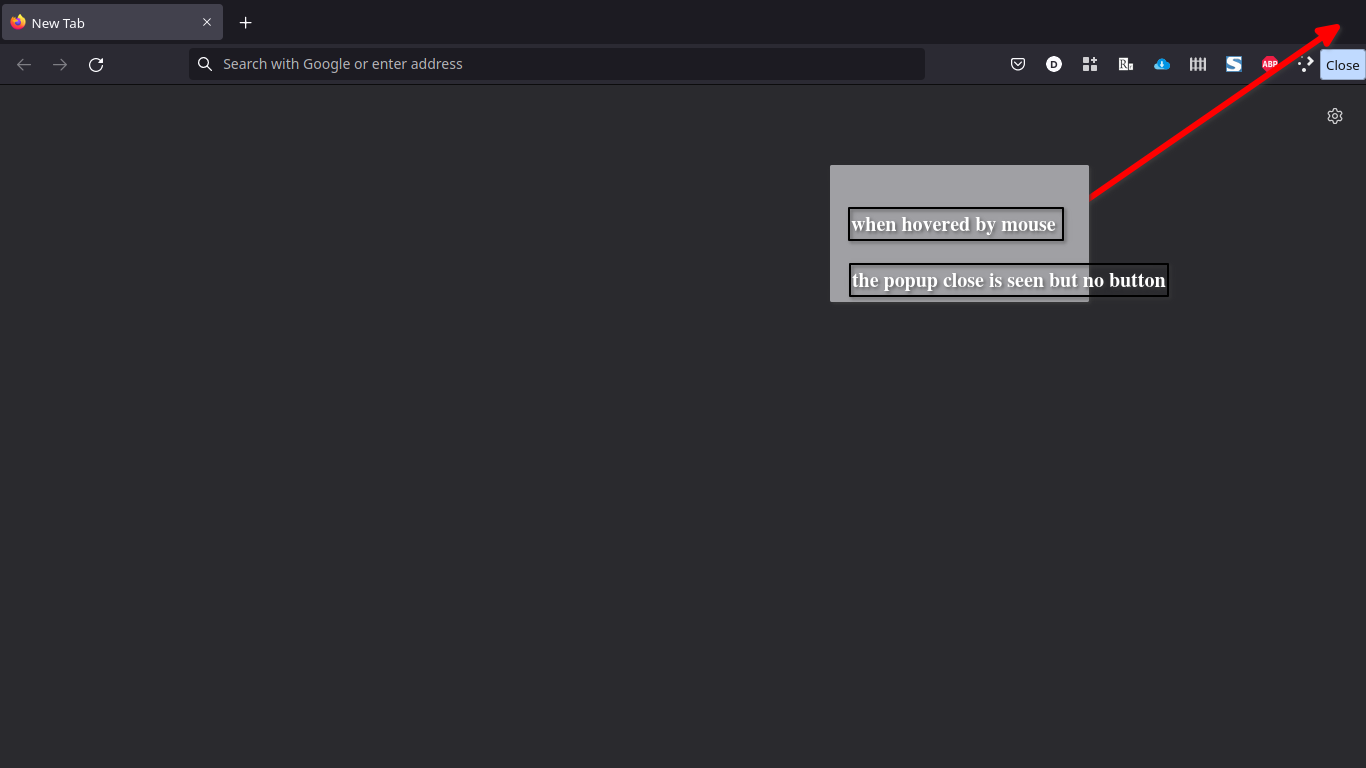
The trouble I face is, I do not see buttons such as Close, Minimize / Maximize, Restore / Minimize Buttons, but when hovered by mouse at Right Top corner, a text balloon pops-up stating the actions present there, invisible.
How to make those invisible little buttons visible there?
I am on '''Ubuntu'''. As by default, there is a '''title bar''' which takes up a little extra space of the viewport, I've '''disabled''' it, which gives some more space for the content.
The trouble I face is, I '''do not see buttons such as Close, Minimize / Maximize, Restore / Minimize Buttons,''' but when hovered by mouse at Right Top corner, a text balloon pops-up stating the actions present there, '''invisible'''.
How to make those invisible little buttons visible there?

Opaite Mbohovái (1)

I got those (Mozilla) buttons (see screenshot) by setting the following to true in about:config. You have to create the preference. Open a new tab, enter about:config in the url bar, accept the risk and enter the preference in the text area at the top. browser.tabs.drawInTitlebar
