

Ko téma oñeñongatúma.
Ejapo porandu pyahu eikotevẽramo pytyvõ.

Solved
Ñongatupyre
Firefox Nightly overtook regular profile, now it can not be used by regular Firefox

To help test some bugs in Firefox I installed Nightly a while ago alongside the regular Firefox.
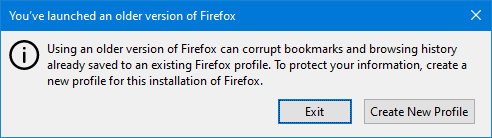
Today when starting Nightly, it used the profile I use in the normal release Firefox, for work mostly. I exited almost immediately, but when I try to run the profile with regular Firefox, I get a warning that I'm using an older version of Firefox. See attached screenshot.
Is there a way to recover the profile?
Current FF version I have is 90.0.2 on Windows 64 bit.
To help test some bugs in Firefox I installed Nightly a while ago alongside the regular Firefox.
Today when starting Nightly, it used the profile I use in the normal release Firefox, for work mostly. I exited almost immediately, but when I try to run the profile with regular Firefox, I get a warning that I'm using an older version of Firefox. See attached screenshot.
Is there a way to recover the profile?
Current FF version I have is 90.0.2 on Windows 64 bit.
Opaite Mbohovái (2)
Ñemoĩporã poravopyre
I started Firefox with the --allow-downgrade command line option and it seem to work. Will report back if anything new arises.
Wow, Nightly should never take over your regular profile. Sounds like you are in a good place now.