


Emails don't arrive immediately
Hi,
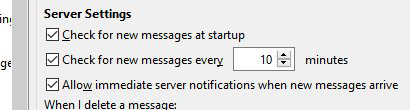
I have set the 'Allow immediate server notifications when new messages arrive' checkbox in the account server settings but emails often take minutes to show up. Is this normal or can they be made to literally arrive instantly?
Opaite Mbohovái (3)
what occurs depends of the capabilities of your mail provider? is it one like Google or a privately hosted mail server? For immediate notifications to work the server must support the IMAP extension command Idle. This is supported by Gmail, but not I believe outlook.com/Hotmail for instance.
All my accounts are Gmail, at least the ones that I'm considering using with Thunderbird.
gmail does support the idle command, so if the option to allow immediate notifications is set in account settings Google will notify when new mail arrives.
If it is not occurring, you might want to look at things that might make the communications channel struggle, like anti virus monitoring or firewall blocking.