


Update from 32bit to 64bit but it DOESN'T support the profiles i have
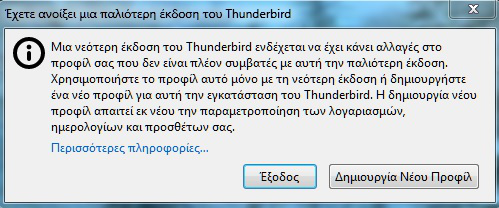
I have the the thunderbird 68.2.1 32bit with my mail and profiles. I install/update into 64bit but when i try to start the new thunderbird 68.2.0 64bit. It bring me the error message of the picture.
Why is this happening? How it can be 64bit of thunderbird DOESN'T SUPPORT THE 32BIT OF THE SAME PROGRAM???????
Opaite Mbohovái (5)
can you provide the translation of at least the title of that window?
Already did.
And here is the full translation of this issue/picture.
"An Older Version of Thunderbira A Newer Version of Thunderbird May have made changes to your profile that are no longer compatible with this older version Use this profile only with the latest version or create a new profile for this Thunderbird installation, create a new profile also requires customization of accounts. your calendars and add-ons. More information."
Read my first post please.
Moambuepyre grecory13 rupive
Select Help/Troubleshooting Information, click about:profiles. Do you see another profile listed besides the one currently in use? If you 'Launch in new browser', do you see your normal setup? If so, go back to the profile list and set this profile as Default.
No i don't see my profile even i run the program with the parameter -p at the shortcut.
If your old profile is not in the default location, or TB has lost track of it, start Profile Manager, create a new profile, and browse to the profile folder that contains your previous data.