


When I try to bookmark a page the "add bookmarks" dialog does not open
It used to be than when I selected BOOKMARKS - BOOKMARK THIS PAGE a dialog box would drop down and I could choose where I wanted the bookmark stored. Now the dialog box does not open, Firefox just goes ahead and stores the bookmark where it wants to and I have to find it and move it to where I want it. How do I fix this?
Ñemoĩporã poravopyre
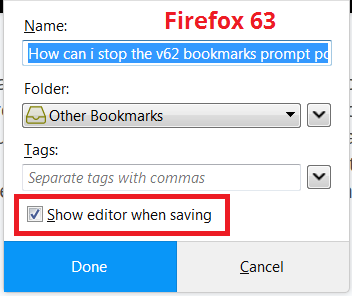
Does Firefox still save the bookmark and display a blue star in the address bar? If so, go ahead and click the star, and look for a checkbox on the drop-down panel to "Show Editor when saving":

Does that work on yours?
Emoñe’ẽ ko mbohavái ejeregua reheve 👍 1Opaite Mbohovái (4)
Ñemoĩporã poravopyre
Does Firefox still save the bookmark and display a blue star in the address bar? If so, go ahead and click the star, and look for a checkbox on the drop-down panel to "Show Editor when saving":
Does that work on yours?
Yes, that worked. Thanks lots.
Don
DonInElliott said
Yes, that worked. Thanks lots.
Hello Don,
Would you be so kind as to mark jscher2000's post as Chosen Solution ? ("Solved Problem" button to the right)
Thank you in advance !
Hello again Don,
You inadvertently marked my post as Chosen Solution instead of jscher2000's post ....
You can rectify it by clicking on the "Undo" button to the right, and then mark jscher2000's post.
Sorry to put you through all this trouble .....