I would like to save photos received as IMG_xxxx.jpg as ordinary .jpg files.

If I try to save e-mail photo attachments identified as IMG_xxxx.jpg, I get eml. files, with no option to save as ,jpg.
Opaite Mbohovái (3)

Ñemoĩporã poravopyre
What are you doing? It sounds like you are trying to save the entire email and not the image.
Are these images embedded in the message or are they attachments?
Thanks for your response.
These photos are attachments, and I'm trying to save only the photos. The heading at the top of each photo is the IMG sequence I indicated. I recently switched back to T'bird from Postbox, where the corresponding sequence was simply xxxx.jpg.
If I select the IMG sequence and apply "Save As", the photo is now identified as "more Prague pics.eml", and the Save As types offered are:
All Files', Mail files, HTML files and Text files,
with no opportunity to select .jpg.
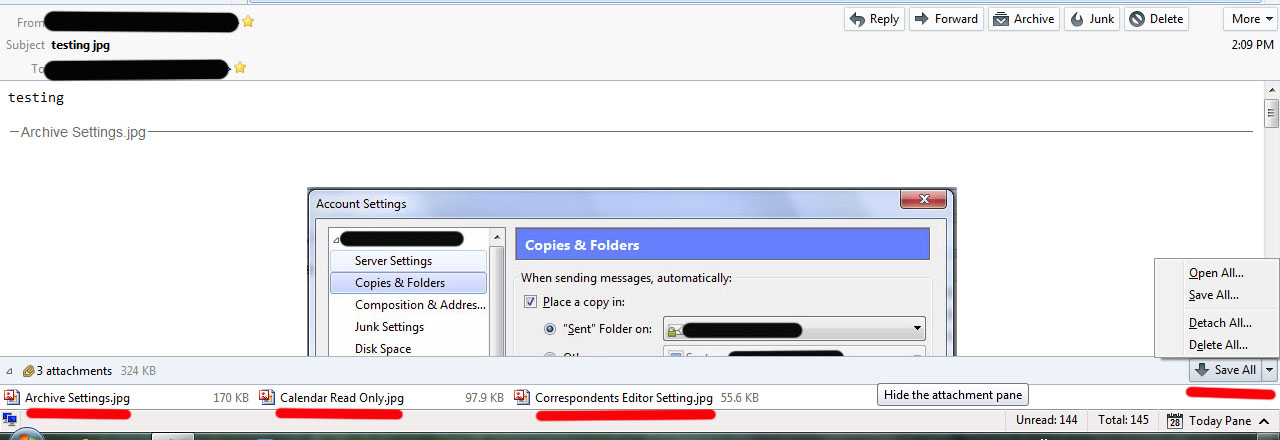
I still do not understand what you are doing. Thunderbird does not change file names of attachments. Attachments are listed at the bottom of the Thunderbird window. There is a Save button at the far right end of that bar. See image.