


installing addons

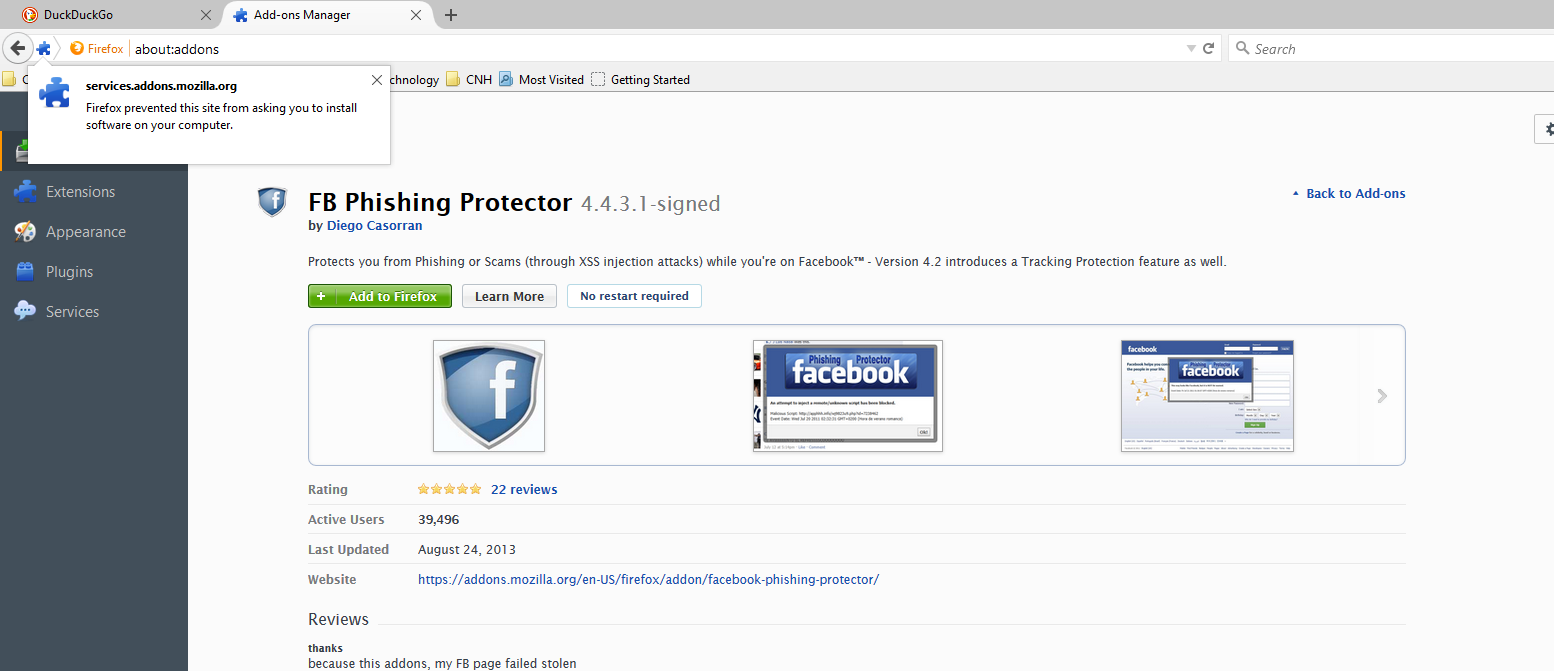
I think the screenshot speaks for itself.
I am not even able to install add-ons from Firefox's own add-on site. Yes, I did check the security section. Even though addons.mozilla.org was already on the whitelist, I went ahead and added services.addons.mozilla.org to the whitelist and I still could not download any addon. I then turned off the warning, and it still would not let me install the addon. I also restarted firefox each time to confirm the change was saved.
Firefox 40.0.3 Windows 10 x64
Moambuepyre lifeofmessiah rupive
Opaite Mbohovái (6)
First, you need to read my post. It's a completely unrelated issue.
thank you for reporting this issue, lifeofmessiah. it's a bug!
lifeofmessiah,
Did you try installing that add-on directly from the Add-on website? https://addons.mozilla.org/en-US/firefox/addon/facebook-phishing-protector/
I can't verify it will install from AMO, didn't try it there - I use NoScript for XSS attack protection.
This seems to be some kind of framing security issue. On the panel with the green "Add to Firefox" button, if you right-click > This Frame > Open Frame in New Tab, then it works in the new tab. That probably will take some time to fix.
oh i missed a verified bug reported from philipp sorry for the long and unrelated post.
Moambuepyre user1241316 rupive
Do you see the services.addons.mozilla.org site on the about:permissions page?
Try to save the XPI file on the Add-ons site (right-click: Save Link As) and install the extension by dragging the file in a Firefox tab (windows).
You can inspect and manage permissions for the domain in the currently selected tab via these steps:
- Click the "Site Identity Button" (globe/padlock) on the location/address bar
- Click "More Information" to open "Tools > Page Info" with the Security tab selected
Go to the Permissions tab (Tools > Page Info > Permissions) to check the permissions for the domain in the currently selected tab.