


How can I restore my bookmarks?
Today, when I went on Mozilla, all my bookmarks were still there, but all my previous browser history was gone, so I was trying to fix that. I had added the "FEBE" add-on & tried backups for restoring the history. Now, all my bookmarks are gone, but when I go into my Mozilla profile, the "bookmarkbackups" folder & the files contained in it are still there.
Ñemoĩporã poravopyre
Also, the forum software detected your Firefox as version 37. Is that correct?
Version 37 is not secure; Mozilla discloses security flaws after each new release. Is something holding you back from upgrading to Firefox 40 (out today)? Please let us know so we can suggest solutions or workarounds.
If Help > About Firefox shows Firefox 40.0, you may need to clear the preference that is misreporting your version number. See: How to reset the default user agent on Firefox.
Emoñe’ẽ ko mbohavái ejeregua reheve 👍 0Opaite Mbohovái (12)
Are the bookmarks completely missing from the Library dialog as well, Ctrl+Shift+b?
If they are listed in the Library dialog but missing from the main toolbar/menu, there might be a corruption issue in the database.
If they are not there, either, try using the Restore feature: Restore bookmarks from backup or move them to another computer. Are the dates on the menu recent enough to get what you need?
Ñemoĩporã poravopyre
Also, the forum software detected your Firefox as version 37. Is that correct?
Version 37 is not secure; Mozilla discloses security flaws after each new release. Is something holding you back from upgrading to Firefox 40 (out today)? Please let us know so we can suggest solutions or workarounds.
If Help > About Firefox shows Firefox 40.0, you may need to clear the preference that is misreporting your version number. See: How to reset the default user agent on Firefox.
Thankfully upgrading to the latest version restored my bookmarks! Thank God! I was so scared I had lost them! That's one problem solved! Now I just have to figure out how to restore all my browser history! Thanks for the help!
Might be a good time to make extra backups in your Documents folder. I suggest using both formats:
Yeah, I know. You don't happen to know how I can restore my previous browser history, do you?
There is no automatic backup/restore for history. But on the other hand, it usually does not erase itself. Some possible explanations:
- Refresh feature ran but failed to save history. In that case, there would be an Old Firefox Data folder on the desktop with a semi-randomly-named folder inside with recently modified files.
- The database file which stores history and bookmarks became corrupted. There is an extension which has some utilities you can run on it, but I don't know whether it helps in a case like this: https://addons.mozilla.org/firefox/addon/places-maintenance/
- Utility/privacy/security software cleaned out your browser data. I'm not aware of any way to recover from that.
I still have the "places.sqlite" files in my Firefox profile. In terms of the "refresh" feature, if I tried that, would it make it worse? Also, if I installed the add-on, what do I do next with it? Thanks & I really really hope I can get the history back.
Hi cje24576, don't do a refresh now unless there are performance issues.
Places Maintenance lets you trigger database maintenance actions that normally run automatically but sometimes stop running for unknown reasons. As far as I know, that's all it does. Sometimes if an internal data structure is broken, that will fix it.
Well, these are the options it shows when I click "options" from the "add-ons" page: First it has 4 different preset options: "none"; "all"; "maintenance", & "deep check". The following are the options that are shown below: "check integrity"; "rebuild indices"; "expire"; "check coherence", "vacuum", & "statistics". Which ones of the preset options would you recommend? And which ones of the other options would you recommend? Thanks.
Sorry, I'm not very familiar with this tool. I suggest trying the check integrity, rebuild indices, and check coherence options individually.
Well, I think you might be correct about a corrupt file. I attached a screenshot of what I see when I go to my Firefox profile.
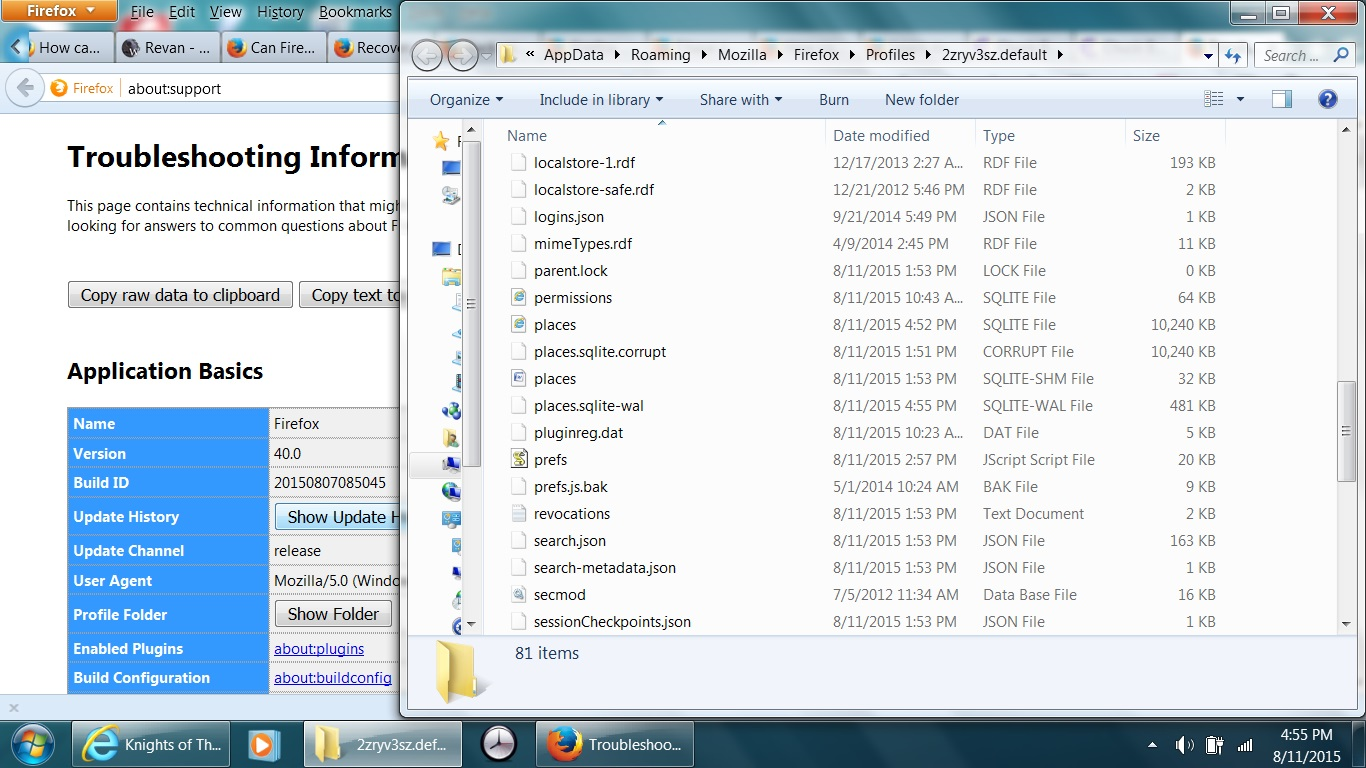
I'm not sure how important this history is... the method I've seen to use the .corrupt file is rather involved: https://developer.mozilla.org/en-US/docs/Mozilla/Tech/Places/places.sqlite_Database_Troubleshooting#How_to_%28try_to%29_recover_from_a_corrupt_places.sqlite