


Windows 10 reached EOS (end of support) on October 14, 2025. If you are on Windows 10, see this article.

Search Support

Avoid support scams. We will never ask you to call or text a phone number or share personal information. Please report suspicious activity using the “Report Abuse” option.

Learn More

How to delete preference to always store Passkey on device?

  • No replies
  • 0 have this problem
  • Open

What happened: 1) I wanted to create a Passkey for a website and store it in Bitwarden. 2) Bitwarden pop-up opened, but while exploring the options, I accidentally clicked on the option "Use your device or hardware key: Always for this website". 3) Windows Defender dialog popped up with the options "iPhone, iPad or Android device" and "Security key" 4) I backed out of the dialog window 5) I clicked the button to create a Passkey again but going forward only the Windows Defender pop-up appears

The problem: I now cannot create a Passkey to store in Bitwarden on a specific website, because I accidentally clicked on "Use your device or hardware key: Always for this website".

What I've tried that didn't work: - looking through Bitwarden settings - deleting Firefox cookies - doing the same thing in Private Browsing - asking AI and looking through about:config, about:preferences and about:logins, as well as trying to find profile files related to webauth

Found workaround: - creating the Passkey from a different Mozilla profile

I would still very much like to be able to undo the "Always for this website". Is there a way to do that? (Attached images were captured later when recreating the situation.)
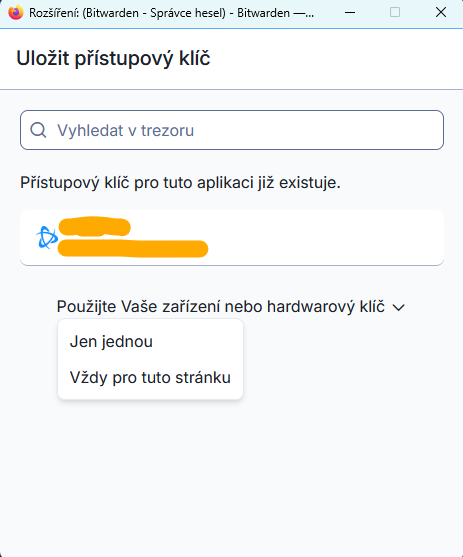
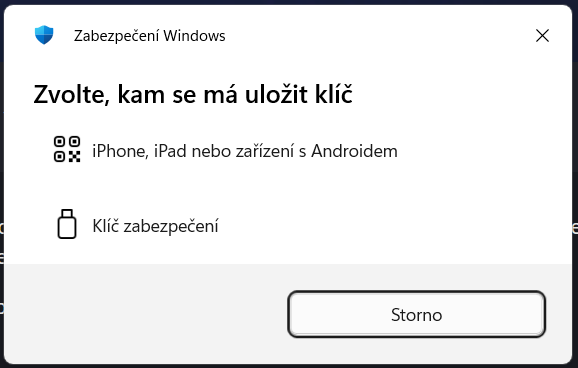
What happened: 1) I wanted to create a Passkey for a website and store it in Bitwarden. 2) Bitwarden pop-up opened, but while exploring the options, I accidentally clicked on the option "Use your device or hardware key: Always for this website". 3) Windows Defender dialog popped up with the options "iPhone, iPad or Android device" and "Security key" 4) I backed out of the dialog window 5) I clicked the button to create a Passkey again but going forward only the Windows Defender pop-up appears The problem: I now cannot create a Passkey to store in Bitwarden on a specific website, because I accidentally clicked on "Use your device or hardware key: Always for this website". What I've tried that didn't work: - looking through Bitwarden settings - deleting Firefox cookies - doing the same thing in Private Browsing - asking AI and looking through about:config, about:preferences and about:logins, as well as trying to find profile files related to webauth Found workaround: - creating the Passkey from a different Mozilla profile I would still very much like to be able to undo the "Always for this website". Is there a way to do that? (Attached images were captured later when recreating the situation.)
Capturas de pantalla anexas

You must log in to your account to reply to posts. Please start a new question, if you do not have an account yet.