


STOP removing useful functions-screenshot, center search bar and recent visits along the lower edge

Why the h377 did firefox change the screen shot tool by removing it from the address bar AND delete the center search bar, along with changing the location of all my recent web visit from the along the bottom of the screen? This is annoying and unhelpful to pc users, I need these functions back like they were in order to us your site on my pc. I donot and will never use firefox on my phone. If these functions are gone, then I will have leave as well. Either that or remove the update from my pc and cease ALL further updates.
All Replies (18)
Hi. I just searched here for info on the screen shot, there are a few post.
if you right click the toolbar > Customise toolbar > you can drag the Camera icon to the search bar.
You can also a search bar and position it if you like, but the URL/address bar seems to used for that anyway.
Thanks for taking the time. The suggestion about toolbar>custom toolbar was exactly the route I took, prior to posting the question; problem is, there is NO CAMERA on that page for one to drag to the toolbar. It has been removed from the tool selection on firefox, And I know the upper search bar is used for searching, however, I prefer mine in the center of the page where it was prior to the horrible upgrade; along with icons for all the current site visits, incase I needed to flip back and forth between a couple. So convenient, but it is no longer available either. After all, is it not smarter to set up ones computer in the fashion that works best for each individual user? I don't doubt that the information you found was the only info available on firefox's site. I, too, found outdated old antiquated info on the screenshot tool, making one think it is still available on firefox, when in fact, it is not. Time for me to move away from firefox as they seem geared to cell users and to heck with the rest of us that use a pc for our daily work. Having to spend hours getting my pc back to the way it set up prior to an upgrade is not fun and certainly a waste of my time. This is a chronic problem with firefox, I am just tired of it.
Hi.
I have Win 11 and 153.0.3 though using Raspberry Pi at the moment, so screenshot from here
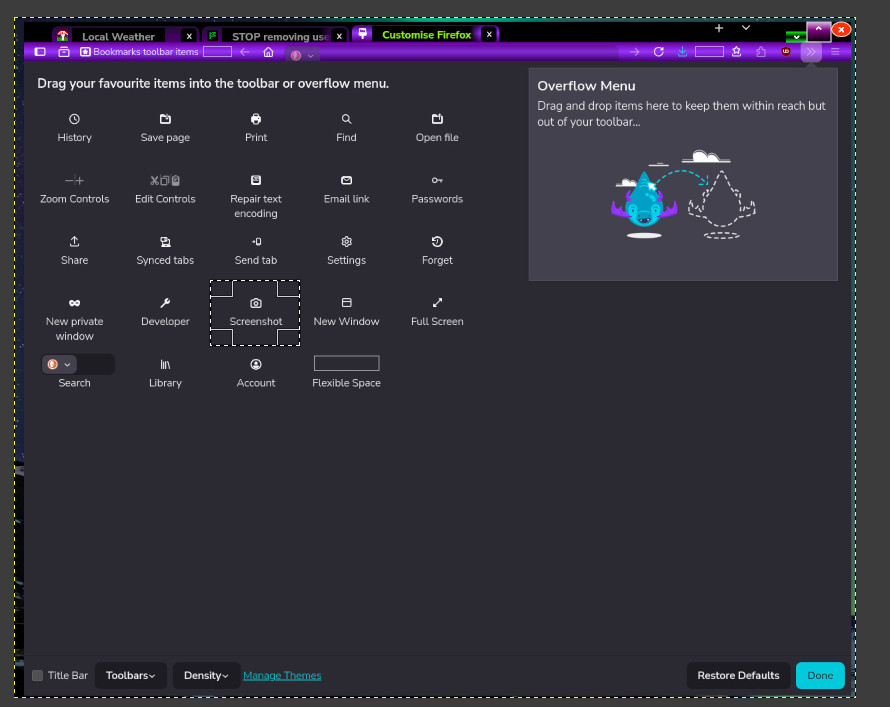
Looking at
And I know the upper search bar is used for searching, however, I prefer mine in the center of the page where it was prior to the horrible upgrade; along with icons for all the current site visits, incase I needed to flip back and forth between a couple. So convenient, but it is no longer available either.
See image
So I have on a separate bar but could put it center of the main toolbar where I keep my bookmarks :)

Athraithe ag amoun ar
I would send you a screen shot , but I cannot as the icon to screen shot no longer exists. I use windows11 as well and it worked perfectly until the last firefox update which happened without my accepting it, a couple of days ago. I am just not happy with them, they create more problems with their updates than another software I use.
While not an answer to the above, if you're having issues with your profile between updates, or with the updates themselves, you can also get Firefox installed by your Microsoft Store if you use it, so that it takes care of the maintenance in the background: Download Firefox on Windows from the Microsoft Store
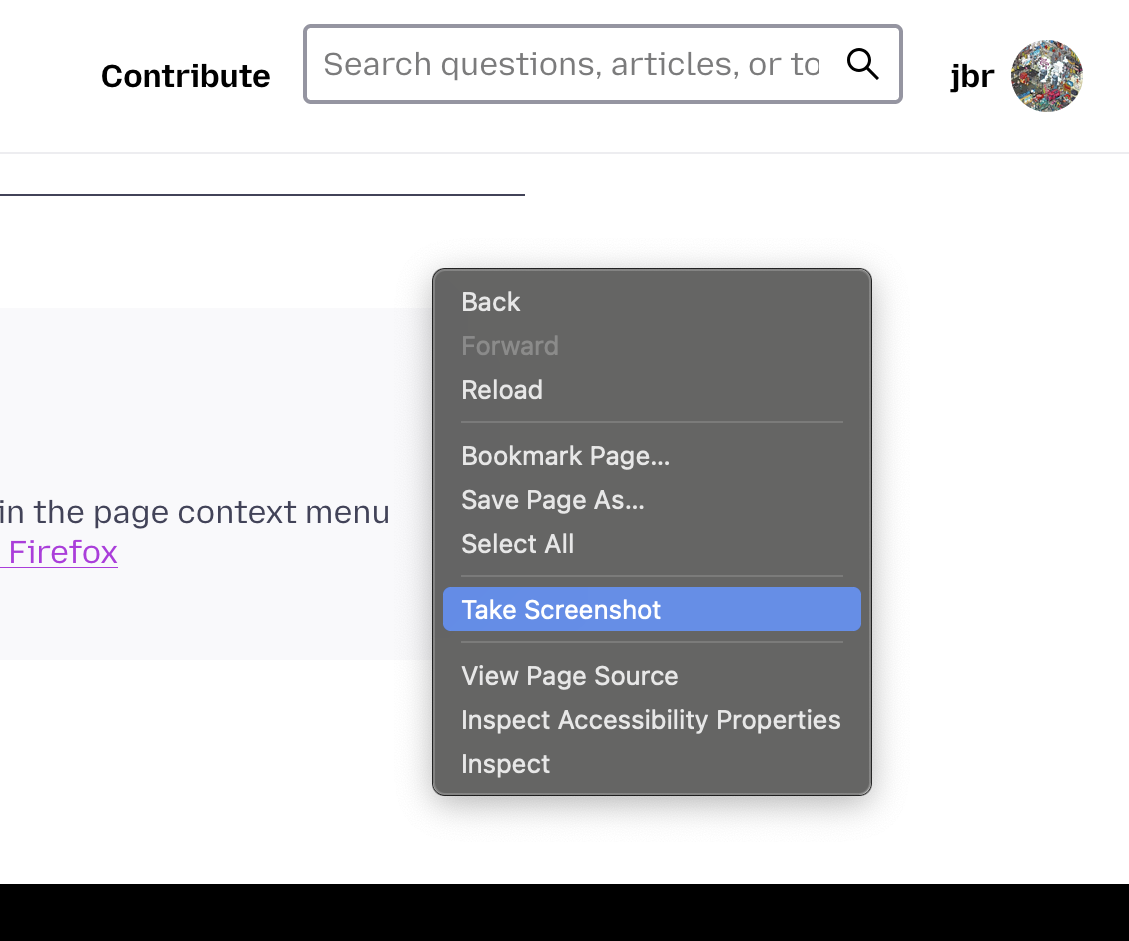
As for taking screen shots in the meantime, you should have the option also in the page context menu anywhere you click in the empty space: Take screenshots in Firefox
Hello
This information https://connect.mozilla.org/t5/ideas/how-to-hide-quot-take-screenshot-quot-from-the-right-click-menu/idc-p/126594/highlight/true#M65373 If you really never use the built-in screenshot functionality in Firefox, you can disable it by setting `screenshots.browser.component.enabled` to `false` in about:config. That will also remove the context menu item.
That will also remove, the Screenshot button.
Other subject, https://support.mozilla.org/en-US/questions/1583718 About, browser.newtabpage.activity-stream.improvesearch.handoffToAwesomebar
WARNING from the moderator team: Changing Firefox preferences from the about:config page can sometimes break Firefox or cause strange behavior. You should only do this if you know what you're doing. Please read Firefox advanced customization and configuration options to learn more.
Athraithe ag Paul ar
Thanks for taking the time. At this point, Firefox has become too much hassle to bother with, they keep making changes that limit what I can do using their site, it no longer make sense for me to continue using Mozilla/Firefox. Have moved on to a different source.
Athraithe ag mail4me2019 ar

Hi,
I understand the frustration, but it's unlikely that Firefox intentionally removed all of those features permanently.
A few things may have changed after a recent update:
Screenshot tool: You can still access it by right-clicking on a page and selecting Take Screenshot. You can also customize the toolbar to add buttons back if available. Search bar: If the separate search bar disappeared, go to Settings → Search and check whether the search bar is enabled. You can also add it back through Customize Toolbar. Recent sites / shortcuts on the New Tab page: Open a new tab, click the gear/settings icon, and check whether Shortcuts and Recent Activity are enabled.
Could you provide:
Your Firefox version (Menu → Help → About Firefox) A screenshot of the current New Tab page Whether these changes appeared immediately after an update
With that information, the community may be able to help restore the previous layout or identify a setting that was changed.
About, Take screenshots Have you checked, the preference, screenshots.browser.component.enabled https://support.mozilla.org/en-US/questions/1585851
Other information, about, Firefox Developer Tools https://firefox-source-docs.mozilla.org/devtools-user Opening Settings https://firefox-source-docs.mozilla.org/devtools-user/settings/index.html#opening-settings Available Toolbox Buttons, Take a screenshot of the entire page
WARNING from the moderator team: Changing Firefox preferences from the about:config page can sometimes break Firefox or cause strange behavior. You should only do this if you know what you're doing. Please read Firefox advanced customization and configuration options to learn more.
Athraithe ag Paul ar
About, separate search bar Since the release of Firefox 122 https://bugzilla.mozilla.org/show_bug.cgi?id=1852044
Add the Search bar to your Firefox toolbar https://support.mozilla.org/en-US/kb/add-search-bar-firefox-toolbar
Thanks to all that so kindly responded. I have reached my limit with firefox, over the years their so called upgrades have created havoc with the way I use their feature and it is not longer prudent to use them. I have switched now to BRAVE and no longer have to be frustrated by firefox. So thanks to all the humans that replied.
You do not answer the question asked, screenshots.browser.component.enabled
You can add images, such as a "screenshot" of your computer screen https://support.mozilla.org/en-US/kb/mozilla-support-rules-guidelines#w_images-and-other-media
Just to see https://support.mozilla.org/en-US/questions/1588124 For illustration(s) https://www.youtube.com/watch?v=8Nl0n9KePCU, take a look at browser.newtabpage.activity-stream.improvesearch.handoffToAwesomebar
mail4me2019 said
I know the upper search bar is used for searching, however, I prefer mine in the center of the page
browser.newtabpage.activity-stream.improvesearch.handoffToAwesomebar, is it your question
Athraithe ag Agent virtuel ar
I am totally with mail4me 2019. Totally annoyed with this browser. I often use the screen shot too, and it is gone! One suggestion: Try Shift-Windows command-S. Always works
No worries, I am no longer using mozilla firefox, too many problems and every upgrade takes away some function I used. Just not happy with them anymore. But thanks, moved to Brave.
No screenshot functionality is getting removed. (There's backlog to improve the rendering over time. And it's also part of automation and developer tools.)
If you can't see the button anywhere in the overflow toolbar area, and even after resetting the toolbars to factory state the button is not there, that's a bug and it would be helpful to report it. (Yes, there are people saying some toolbar buttons disappeared for them, without being able to pinpoint why — so it would help understanding this issue more.)
Some get the buttons back in Troubleshooting Mode, some in separate new Profile, but neither is an answer why some go missing without a way to get them back even to the default toolbar customization pane. So for anyone willing to file a bug and assist the engineers with e.g. logs or profile data this would be truly appreciated, as it will help the next user not run into the same in the future. Thanks.
Not using mozilla firefox due to the on going problems with their so called upgrades, just toooooo frustrating to hunt for a fix to find and use a function that worked perfectly until they messed with it. Gone and not coming back.