


Browser sidebar Bookmarks button; recent bookmarks hide and show

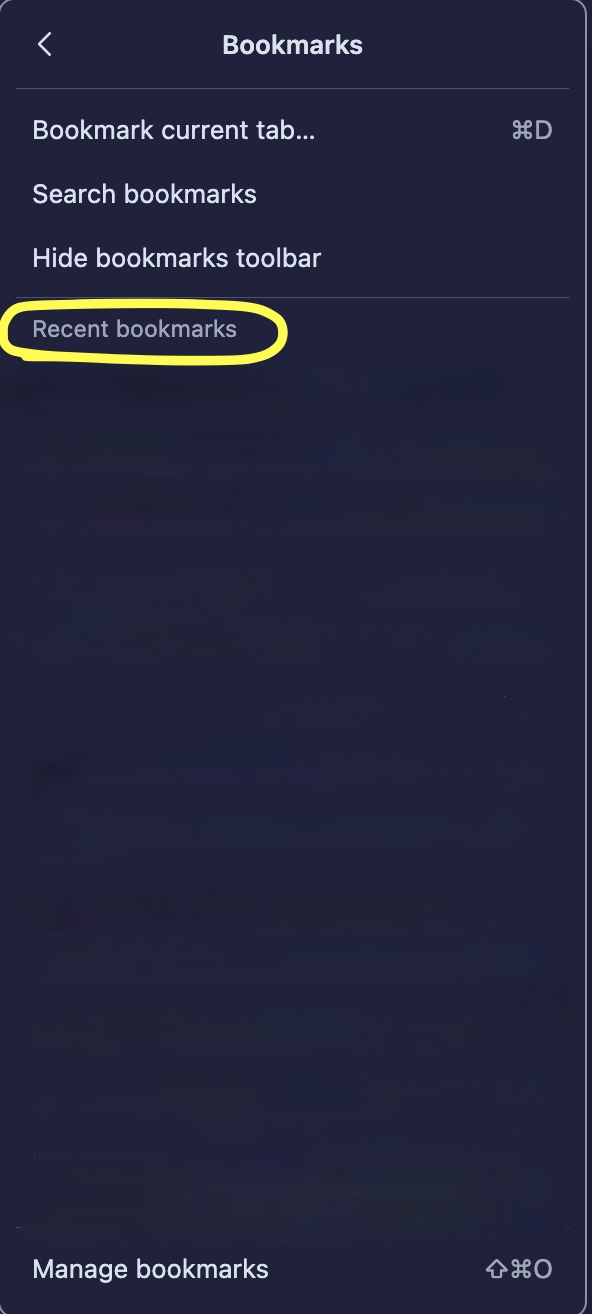
There is a section called "Recent bookmarks", which appears after clicking on the 'Bookmarks' button in the browser sidebar. My problem with it is that it appears automatically, and it cannot be hidden, removed, or minimized; and shows all the recent bookmarks saved or imported to firefox. I feel very uncomfortable using the browser with such a feature. I would tell you that I switched to Firefox from Apple's Safari browser; and one of the reasons for such move was this same problem in that browser. I'm using the latest version of firefox browser v 152.0.5 (64-bit), on macbook pro m4 running latest macOS. Please help if you can how to either hide or remove the "Recent bookmarks" or please consider adding the capability for the user to do so, in the next browser update.
Thank you.
All Replies (1)
Hi,
The people who answer questions here, for the most part, are other users volunteering their time (like me), not Mozilla employees or developers. When a Mozilla employee jumps into a discussion, you'll see the Mozilla Staff label next to their name.
If you wish, you can leave feedback for developers on the Mozilla Connect website. Click the Firefox Menu  button in the toolbar, click Help and select Share ideas and feedback…. Alternatively, you can use this link. Your feedback is collected by a team that reads it and gathers data on the most common issues.
You can also file a bug report or feature request. See File a bug report or feature request for Mozilla products for details.