


'Local folders' no longer appears in the side bar (Mac).

After I migrated everything to a different computer, 'Local folders' no longer appears in the side bar, so I cannot archive messages locally.
Can some kind person please help me to reinstate it?
All Replies (4)
Réiteach Roghnaithe
May be you accidentally clicked on the "Folder pane options" ●●● button and chose "Hide Local Folders"?
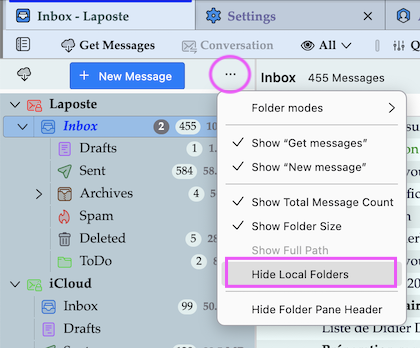
Thank you so much, Mapenzi. Perfect. I'd been trying for so long to solve this! And all this time those three little dots (which I hadn't even noticed) held the answer!
Thunderbird developers have tendency to put certain drop-down menus behind ominous dots and lines ....
Athraithe ag Mapenzi ar

This is the worst UX/ UI I have come across in such a long time. I have no idea where the hell the Local Folder is, even copilot is struggling, and had a meltdown hahaha great job Mozilla you broke Microsoft’s AI. Well that’s a few hours of my life I won’t get back. If anynone does know how to fix what should be a very simple intuitive thing please email.i’m shattered and it’s 03:32am.
Athraithe ag phz9h462wf ar