


SMTP configuration

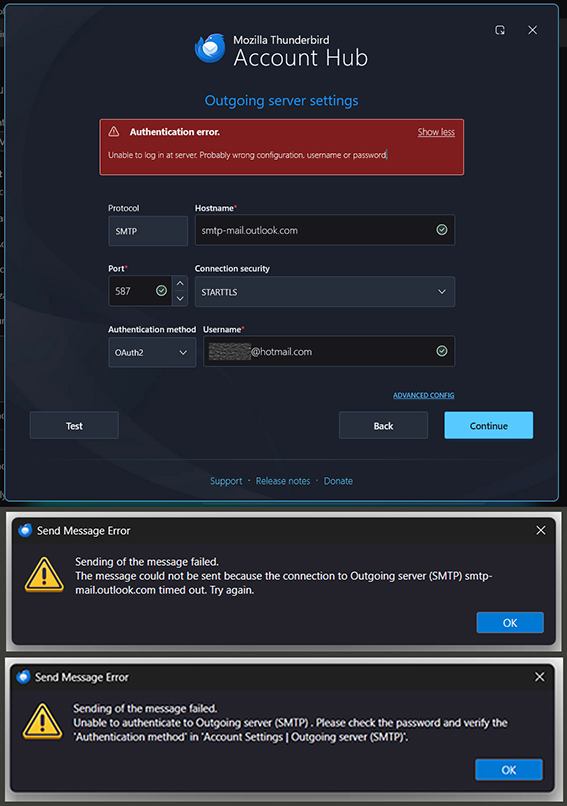
I have been using Thunderbird with two POP3 Hotmail accounts for some time and I am trying to set up a third account with exactly the same configuration. However, both the automatic and the manual configurations failed. The new account receives mail, but the outgoing smtp server config seems to have a problem. Sending messages times out or keeps prompting for a new password.
The Hotmail account has POP3 and IMAP enabled. Thunderbird is set to receive all cookies. I cleared history and cache after every attempt and also temporarily disabled the firewall.
Any suggestions about what the problem could be?
Réiteach roghnaithe
I am closing this discussion now, since it does not lead anywhere. Thank you all for your contributions whatsoever.
Read this answer in context 👍 0All Replies (9)
re :the new mail address, which I configured in Thunderbird as primary,
Just checking we are on the same page - you do not configure the 'primary' setting in Thunderbird. The 'primary' setting is set up in the 'Microsoft Account' accessed via browser. The 'Micosoft Account' is not a mail account, but it contains mail accounts/email addresses.
re :The reason why I signed up for a new account was a name change.
I presume the name change was for the Microsoft Account - you do not have to create a new Micosoft Account just alter a name change.
You access the Microsoft Account and add/create another email address and then set that new email address as primary. So you have two email addresses in one Microsoft Account with one set as primary.
Quote from MS help Article:
To rename your personal account you can either create a new email address (alias) or set an existing email address to be your primary alias. To rename your account, go to the 'Manage how you sign in' section of your 'Microsoft account' and select 'Make primary' for one of your existing addresses, or add a new one.
You can easily renew a subscription without creating a new Micosoft Account.
Life gets complicated when you keep needing to create email addresses to create new Micosoft Accounts. I would be more inclined to decide which one you want to keep. I would choose the 'Micosoft Account' that contains the email address you use the most. In that 'Microsoft account, you could create/add another email address and then in the Microsoft Account you are going to delete - Forward all emails over to the new email address located in the other Micosoft Account which you are keeping. That means you would end up with the one Microsoft Account containing all your email address. When you want to create another subscription follow instructions to renew/create in the remaining Micosft Account.
Well, first of all, of course I meant the «default» account on Thunderbird, which I consider as my primary one.
Applying a different user name to my former MS365 subscription or migrating it to a new account was virtually impossible. I really did not want to get tied up again in one of those tedious support cases, where their so-called «specialists» only makes you waste your time. This was a good chance to get rid of that crap and switch to LibreOffice, which works well for me now, and it’s free! However, my question was not about having one or two mail accounts. It should be more than logical to sign up for a new account when your name changes, while you keep simultaneously using the old account for as long as it takes, until there are no more incoming messages. Theoretically you can configure as many different mail accounts as you want, but Thunderbird seems to have a problem with Hotmail accounts.
So the issue is not about using different aliases or independent accounts, and how many of this or that. My initial question was, why Thunderbird fails when two pop3 accounts are configured identically, and both accounts receive, but only one of them is able to send mail via smtp. This question remains unanswered.
Athraithe ag CGV ar
The rules are not set up by Thunderbird. Microsoft messed this up for third party email clients. It's a real pain and deliberate by Microsoft. Microsoft state - when using smtp for an email address, you have to use whatever 'email address' is set up as the 'primary' email address in the relevant 'Microsoft Account' that contains that email address.
This has worked for the dozens of people I have helped. It all depends upon what is set up in the 'Micosoft Account' that contains the email address. If you have two 'Microsoft Accounts' (not the same as email addresses) and each Microsoft Account has one email address, then in both 'Micosoft Accounts' the email address should be set up as 'primary'. That means each email address in Thunderbird should be able to send using own email address as 'Username'. The 'password' used to access the actual 'Micosoft Account' should also be used as the password for each email address that Microsoft Account contains.
If you have One 'Microsoft Account' and it contains two email addresses, then one needs to be set up as 'primary' and in Thunderbird all email addresses in that 'Microsoft Account' can only use the 'primary' email address when using smtp. So in effect all of those mail account in Thunderbird send via the same primary email address.
SMTP server settings are dictated by Micosoft and that info was posted in a previous comment.
Thunderbird sends using whatever you set, but only the Micosoft office365/outlook servers can choose to refuse to send if something is not exactly as they require.

I have the same problem. Except I cant send or receive mail. It all started because Outlook told me I needed a second email for security reasons. I set one up in outlook. But trying to set the second one up in thunderbird was a nightmare. So I deleted it. I dont know what I did but now my primary email doesn't send or receive. On sign in I get a message: "Unable to connect". When I hover over the box it also says:"Enter credentials for myname@hotmail.comon outlook.office365.com' When I test the connection to both ingoing and outgoing servers. They both say "Successfully established secure connection". I'm no PC tech by any stretch. But I'm stumped.
Welcome to the Club of frustrated Outlook users! As far as my own attempts are concerned, I've given up. Microsoft has discontinued POP3 access to Hotmail accounts, but they won't tell you. You have to painstakingly figure it out by yourself. You can still find instructions for POP3 config on the Microsoft website. Their own tech support makes you waste your time for weeks with ridiculous suggestions that, of course, all fail. Once you've finally been worn down, they urge you to use either IMAP or Exchange instead of POP3, even though you don't want it. Apparently, it's all about keeping your emails on their Microsoft servers and not on your hard drive, so they can better analyze your activity and spy on you more easily. It's scandalous, to say the least! I've transferred almost all my contacts to a paid, secure email service now.
Sure, just follow the config instructions for IMAP on Microsoft’s website [https://support.microsoft.com/en-us/o.../pop-imap-and-smtp-settings-for-outlook-com-d088b986-291d-42b8-9564-9c414e2aa040] to set up Firebird accordingly, but be aware that you are inviting Microsoft to spy (even more) on your personal data 😒. Good Luck!
Athraithe ag CGV ar
Réiteach Roghnaithe
I am closing this discussion now, since it does not lead anywhere. Thank you all for your contributions whatsoever.
allanlomax said
Thanks very much. Is there a way I can change from POP to IMAP in Thunderbird?
You cannot modify the POP account server settings. You would need to set a new mail account and select the IMAP protocol, so it auto selects all the correct server settings. When you start to create the account, you will probably find that Thunderbird will auto look for the Imap settings which should make it easier.