


right click print

I like Firefox with one exception. The right-click print feature is missing in the drop-down menu. I can print from the Application Menu but the 'print' feature is missing using the mouse right-click menu. The right-click feature does work using other browsers. A picture of my right-click menu using Firefox is attached. THANKS
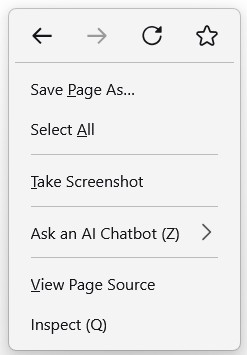
Réiteach roghnaithe
Hi,
Unfortunately, we don't have an option to add a print menu there.
However, you can simply press the Control (Ctrl) key on your keyboard and the P key at the same time and it will open the print tool.
Alternatively, you can add the print action to the toolbar using the instructions here: http://mzl.la/1BAQIvu
Thanks for getting in touch, Isaac
Read this answer in context 👍 0All Replies (2)

Réiteach Roghnaithe
Hi,
Unfortunately, we don't have an option to add a print menu there.
However, you can simply press the Control (Ctrl) key on your keyboard and the P key at the same time and it will open the print tool.
Alternatively, you can add the print action to the toolbar using the instructions here: http://mzl.la/1BAQIvu
Thanks for getting in touch, Isaac
Thank you - Big help. My solution was to just add the print option to the action toolbar at the top of the page. Works fine and easy to do. Simply:
1. Click on the 'Application Menu with the 3-horizontal bars on the top right of the page to open. 2. Click on 'More Tools' 3. Click on 'Customize Toolbar' 4. From the many action icons to choose from, grab the 'Printer' icon and carry it up to the toolbar and let it go.
WALLA - you have a quick and easy click to print solution.