


Updated latest platform SE 7 U51 10.51.2.13 bit not able to open certain website.

Hi,
I have updated my Java with latest version SE 7 U51 10.51.2.13 bit not able to open certain website.
Please let me know now what to do so that I can open the website - www.federalbank.com.
Thanks & Regards, Akansha.
Keazen oplossing
In Windows 7 Operating system try the following. It worked for me
- Open Control Panel
- Open Programs.
- Double click and open Java (Java Control Panel)
- In the Java Control Panel window, Click on 'Security' tab.
- Click 'Edit Site List'
- In the 'Exception Site List' window, click Add.
- Under Location type 'https://www.fednetbank.com/' without quotes
- Click OK in the 'Exception Site List' window
- Click OK in the Java Control Panel window
- Restart Mozilla.
Now try to login to Fednet. This worked for me
Dit antwurd yn kontekst lêze 👍 3Alle antwurden (4)
Even after clicking on shield and then Disable protection on this page - the website is not opening.
Please refer to the screen shot, is it because my "java deployment tool kit is vulnerable" im facing this problem, if yes please let me know how to solve this,
Thanks.
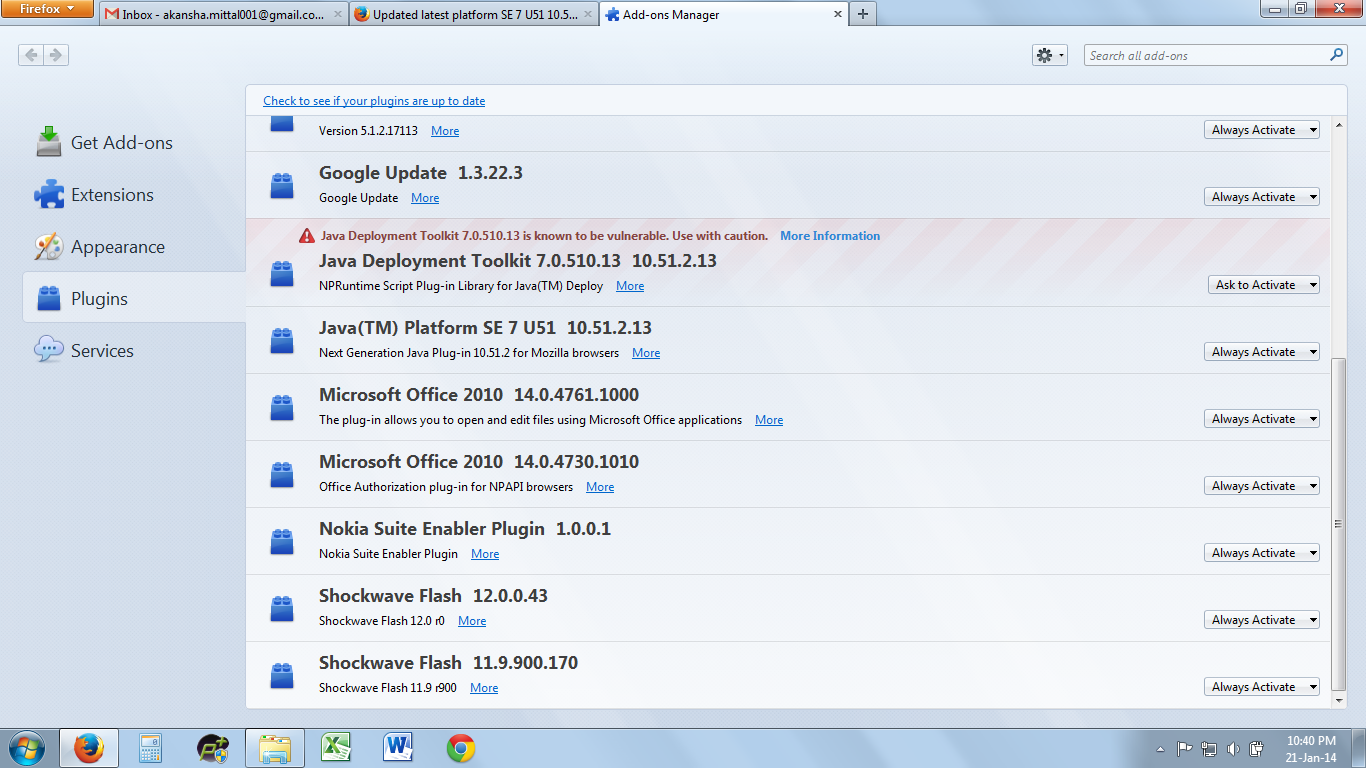
If you need to activate it you can manage from that menu you took the screenshot: Ask to activate in the Add-ons Manager > Plugins tab
If it refuses to let you activate it you can set an exception in the Java Console:
The solution is here: http://www.java.com/en/download/help/jcp_security.xml#control%20panel
How to enable java console: http://www.java.com/en/download/help/javaconsole.xml
Also see:
Keazen oplossing
In Windows 7 Operating system try the following. It worked for me
- Open Control Panel
- Open Programs.
- Double click and open Java (Java Control Panel)
- In the Java Control Panel window, Click on 'Security' tab.
- Click 'Edit Site List'
- In the 'Exception Site List' window, click Add.
- Under Location type 'https://www.fednetbank.com/' without quotes
- Click OK in the 'Exception Site List' window
- Click OK in the Java Control Panel window
- Restart Mozilla.
Now try to login to Fednet. This worked for me
Bewurke troch Santhosh_PKD op
Dear Santosh,
I really want to thank you for sharing the knowledge and untill now I had lost complete hope in solving the issue, but i followed your steps and the issue is solved.
Once again thank you.
Akansha.