


Folders have disappeared

Mail folders have disappeared in Thunderbird for Mac version 158.01. I replaced the files with the folder name, along with the accompanied .msf file from a backup, but the folder is still not showing up. Please help.
Keazen oplossing
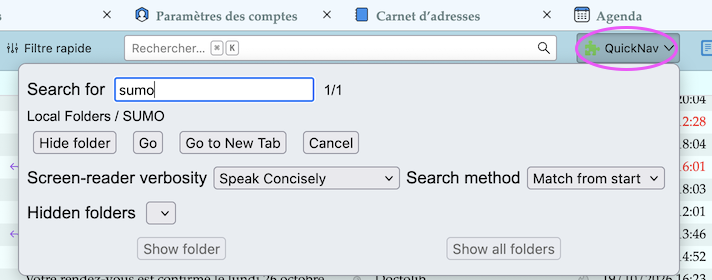
Probably by inadvertance you had moved folders so that they were scattered and no longer in alphabetical order. If some day by misfortune you move folders in another folder and cannot find them again, install the add-on "Quick Folder Key Navigation" https://reviewers.addons.thunderbird.net/en-US/thunderbird/addon/quick-folder-key-navigation/
Alle antwurden (4)
Can you please be more precise about the missing folders? Was it a folder with subfolders which disappeared? Which were your manipulations when they disappeared? Did this happen in a POP or an IMAP account or in Thunderbird's Local Folders? Did you backup the entire Thunderbird profile folder? Can you show a screen shot of the backup directory and indicate the mailbox files you replaced?
Bewurke troch Mapenzi op
Hi Mapenzi,
In the interim, I looked around and found the command "Reset Folder Order" when I right-clicked the main email directory icon in the left column. I clicked it and all the missing folders reappeared. I had no idea what it would do, as I was trying everything, so it was very much a shot in the dark. But it worked. Thanks so much for getting back to me on this. If anyone else comes around with this problem, tell them to try it. It worked for me.
Once again thank you for the prompt response. I appreciate it a lot.
Keazen oplossing
Probably by inadvertance you had moved folders so that they were scattered and no longer in alphabetical order. If some day by misfortune you move folders in another folder and cannot find them again, install the add-on "Quick Folder Key Navigation" https://reviewers.addons.thunderbird.net/en-US/thunderbird/addon/quick-folder-key-navigation/
Hi Mapenzi,
Ok, will do.
Thanks again.
fg