Thunderbird Unable to receive or send emails from CenturyLink

Hi, Last week, Thunderbird stopped receiving & sending emails with CenturyLink. I can access CenturyLink emails via their website and on my android.
Using Google, it said the configuration should be changed to CenturyLink's settings. It looks like Centurylink changed the settings for legacy email "centurytel.net". I went to CenturyLink website and copied their settings the best I could.
1. CenturyLink website shows changes to the following settings.
       a.	Incoming Server:  POP:  pop.centurylink.net    Port: 995, Security:  SSL
       b.	Outgoing Server:  SMTP:  smtp.centurylink.net    Port:   587     TLS if available
       c.	Username:  Full email address which for me ends with @centurytel.net
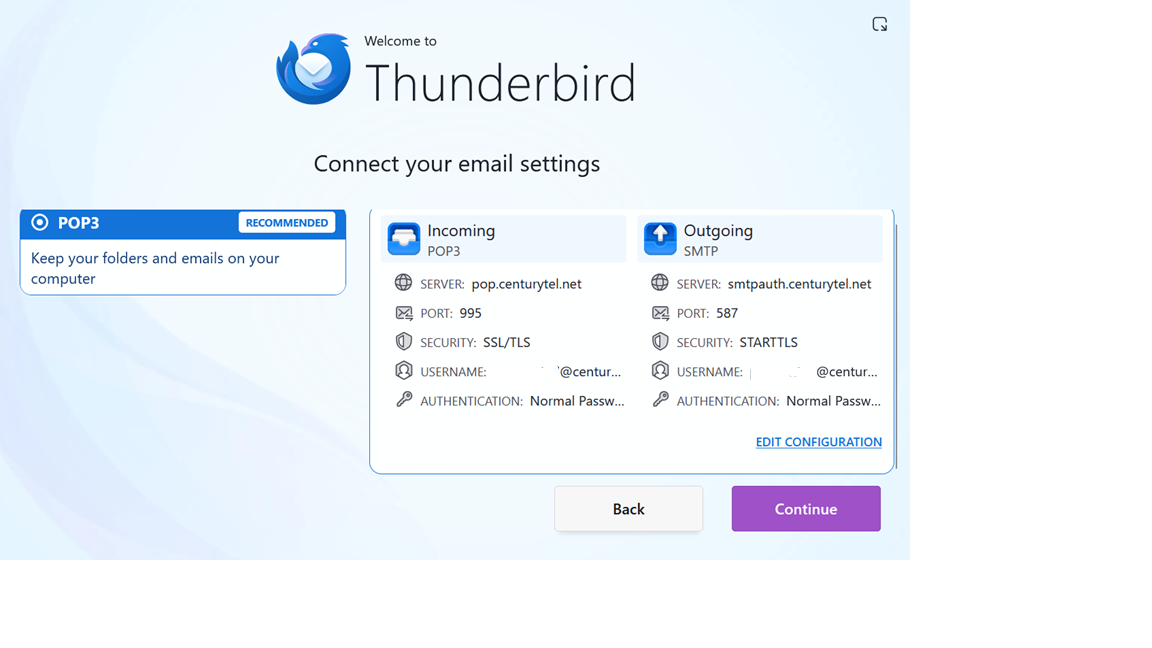
2. Thunderbird settings are: (screen print attached)
        Incoming:  POP: pop.centurytel.net  Port:  995, & Security:  SSL/TLS.
        Outgoing SMTP:   Server:  smtpauth.centurytel.net    Port:  587,  & Security:  STARTTLS
I only changed the POP and SMTP server names. The security settings could not match up exactly since the drop down options did not have SSL and TLS individually. I left the original settings Thunderbird had of SSL/TLS for incoming and STARTTLS for outgoing. A screen print of Thunderbird's original settings is attached.
After following the settings configuration setup in Thunderbird, entering my correct password, I received this Authentication error: "Unable to log in at server. Probably wrong configuration, username or password." That's as far as I can go. Thank you for any help you can provide.