


Windows 10 reached EOS (end of support) on October 14, 2025. If you are on Windows 10, see this article.

Sykje yn Support

Mij stipescams. Wy sille jo nea freegje in telefoannûmer te beljen, der in sms nei ta te stjoeren of persoanlike gegevens te dielen. Meld fertochte aktiviteit mei de opsje ‘Misbrûk melde’.

Mear ynfo

Tb saves msg to wrong folder.

Whenever i send a message , it is saved to the 'inbox' previously it would be saved "sent mail". I have verified that TB is configured to save to sent mail but the msg is saved anyway to inbox.

Can some one explain how to get back to saving sent messages to sent mail folder.

In all honesty I find it frustrating to keep moving msgs manually.

Whenever i send a message , it is saved to the 'inbox' previously it would be saved "sent mail". I have verified that TB is configured to save to sent mail but the msg is saved anyway to inbox. Can some one explain how to get back to saving sent messages to sent mail folder. In all honesty I find it frustrating to keep moving msgs manually.

Alle antwurden (2)

A Google search provides this answer...

(https://www.google.com/search?q=change+where+thunderbird+saves+sent+messages&rlz=1C2VDKB_enGB1120GB1120&num=10&newwindow=1&sca_esv=f1fb8f2ab13df819&sxsrf=ANbL-n4dDWRVyIk875ujzquXiuBkP5UCaA%3A1779651138271&source=hp&ei=QlITaraNDZuvhbIP1e3FmAc&iflsig=AFdpzrgAAAAAahNgUkVxCkfIyq9ze8R0gKH5MAo1vSlQ&ved=0ahUKEwi2tquP1dKUAxWbV0EAHdV2EXMQ4dUDCCU&uact=5&oq=change+where+thunderbird+saves+sent+messages&gs_lp=Egdnd3Mtd2l6IixjaGFuZ2Ugd2hlcmUgdGh1bmRlcmJpcmQgc2F2ZXMgc2VudCBtZXNzYWdlczIFECEYoAEyBRAhGKABMgUQIRifBTIFECEYnwUyBRAhGJ8FMgUQIRifBTIFECEYnwUyBRAhGJ8FMgUQIRifBTIFECEYnwVI239Qig1Y9XtwAXgAkAEAmAF3oAGFHKoBBDQwLjS4AQPIAQD4AQGYAi2gAugdqAIKwgIHECMY6gIYJ8ICDRAjGJ4GGPAFGOoCGCfCAg0QLhjHARivARjqAhgnwgIQEC4YgAQYigUYxwEYrwEYJ8ICBBAjGCfCAhAQIxjJAhjwBRiABBiKBRgnwgILEAAYgAQYigUYkQLCAg0QABiABBiKBRhDGLEDwgIKEAAYgAQYigUYQ8ICExAuGIAEGIoFGEMYsQMYxwEY0QPCAgsQLhiDARixAxiABMICChAjGIAEGIoFGCfCAggQLhiABBixA8ICCxAAGIAEGIoFGLEDwgIOEAAYgAQYigUYsQMYgwHCAggQABiABBixA8ICDhAuGIAEGLEDGMcBGNEDwgILEAAYgAQYsQMYgwHCAgUQABiABMICChAAGIAEGBQYhwLCAg4QLhivARjHARjJAxiABMICBhAAGBYYHsICCxAAGIAEGIoFGIYDwgIFEAAY7wXCAggQABiABBiiBMICCBAAGIkFGKIEwgIHECEYChigAZgDD_EFQgPzLKv99aGSBwQ0MS40oAe5qwKyBwQ0MC40uAfZHcIHCTEuMjMuMTguM8gHmwGACAE&sclient=gws-wiz)

Follow these quick steps:

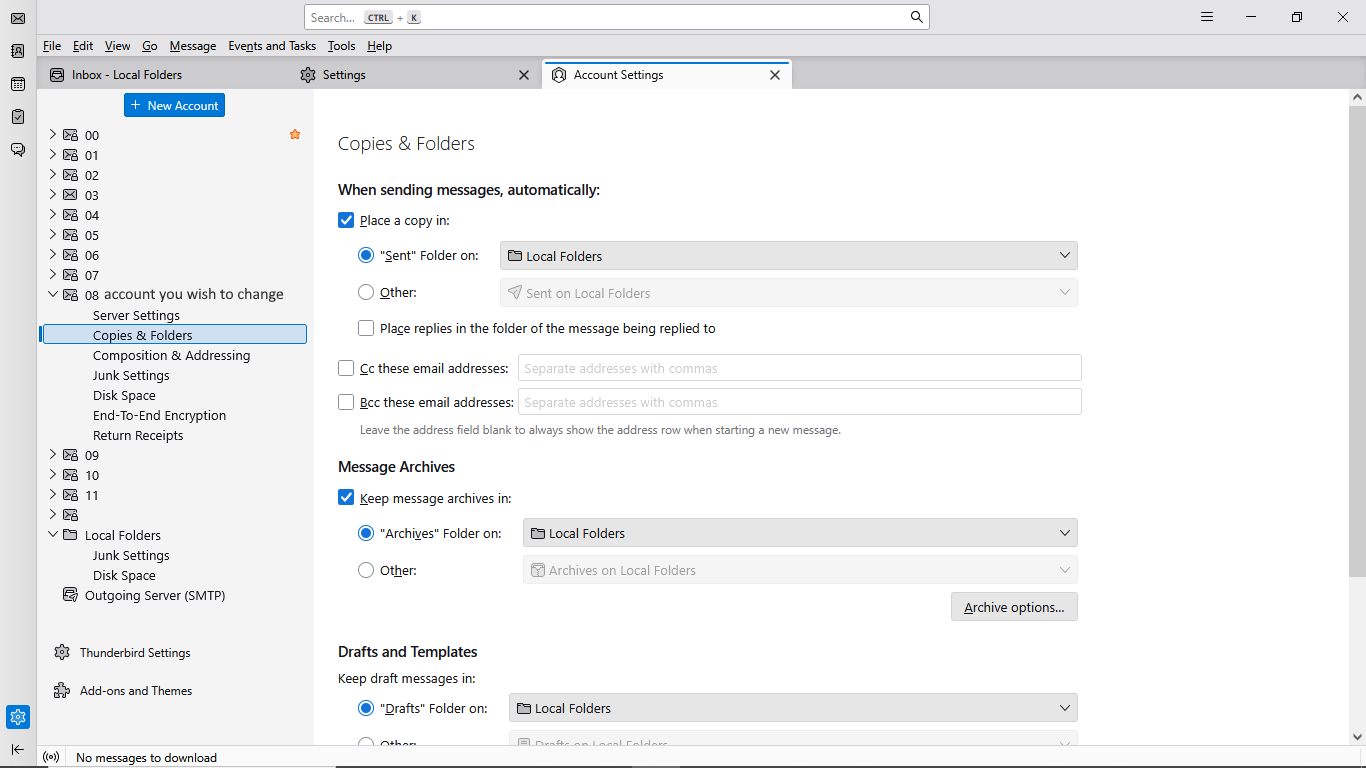
Click the menu icon (three horizontal lines) in the top-right corner of Thunderbird and select Account Settings.

In the left-hand panel, click on Copies & Folders directly under the specific email account you want to change.

On the right side, find the When sending messages, automatically: section.

Locate Place a copy in and choose your preferred destination:

Your settings should look like this (mine)... See attached pic 😉

Hope that helps. 😊
Did this fix your problem, Mike?

In fraach stelle

Jo moatte jo oanmelde by jo account om op berjochten te antwurdzjen. Stel in nije fraach as jo noch gjin account hawwe.