


When I try to re-order folders in the folder pane it only works sometimes

So I have a list of folders some of which are the default folders some are custom created.
When I try to re-order these it is very hit or miss: I select a folder, drag it to where I want it to go, wait for the blue placement line to appear and it may or may not re-locate. Or I simply can't move the folder I want to move and so I move folders around it in order to achieve the layout I want.
It is as if success depends on whether Thunderbird is in the mood for a particular move to happen and I find it really frustrating. It should or shouldn't work, it shouldn't be that it works sometimes.
What is going on with this?
Alle antwurden (6)

It may be lagging while talking to the server. I find that reordering folders is very fast with Local Folders and sluggish with IMAP folders. But I don't recall it ever not working at all, I just sometimes have to be a little patient while things get in gear.
I kind of hate the folder ordering procedure. It's too fiddly and prone to error and more than once I've dropped a folder into another by accident, which can take a long time to recover from if it's a large IMAP folder.
This may or may not be helpful, but I discovered this recently: when you grab a folder, move it over to the right a bit, then move it between two adjacent folders, I see a tiny dot, just a pixel or so, which is the indicator that I can now drop it between them. If I see an adjacent folder surrounded by a box, it will go into that folder when I drop it. I don't see a "blue placement line" but that might be because of my color choices.
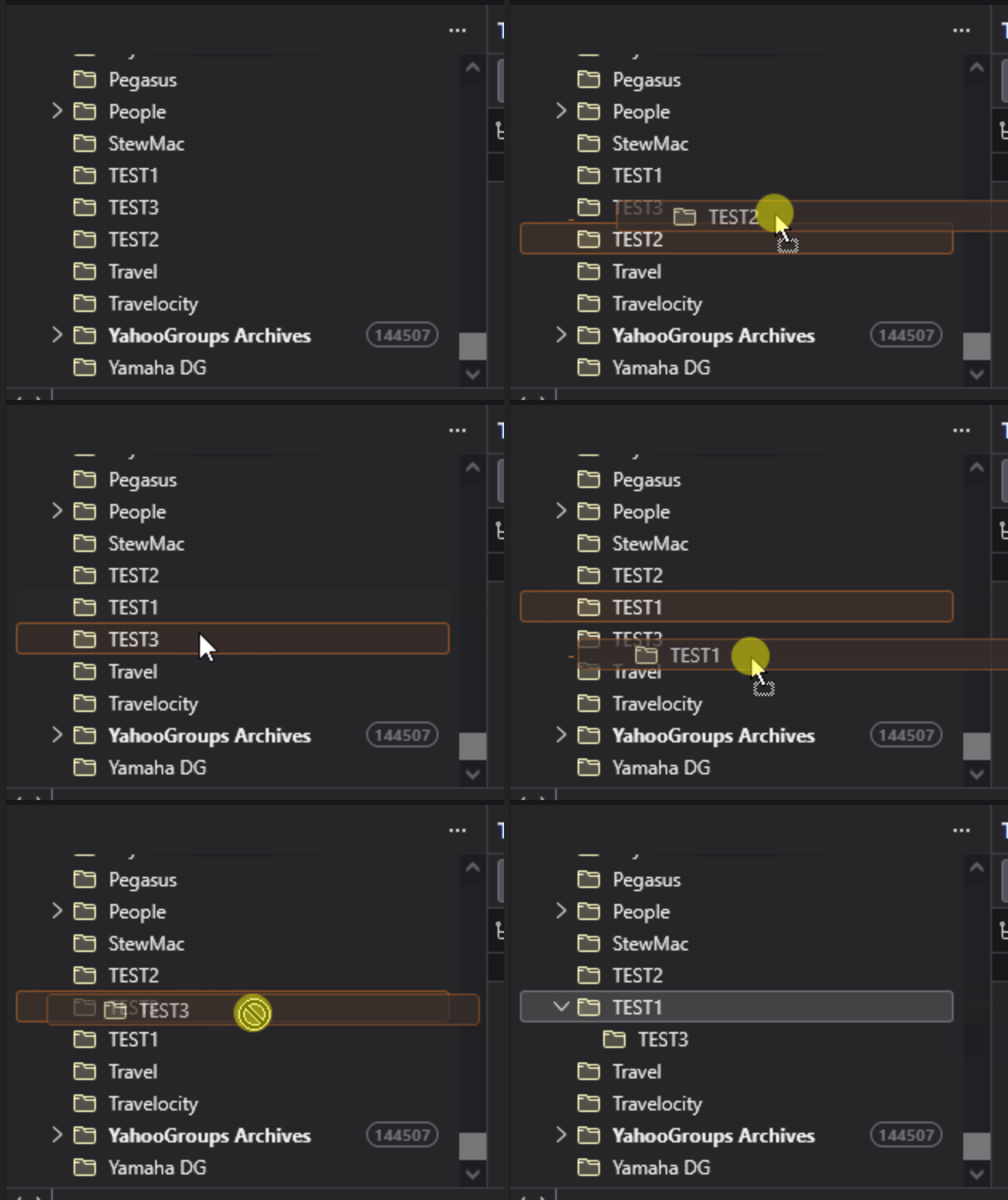
Thanks for the helpful reply but it doesn't work for me :(
When I drag and try to place a folder I get a blue line showing if / where a folder can be placed. I have just tried to do this with the default 'Archives' folder and the blue line only shows when the dragged file is hovering in certain places. What is going on???
I've just done a search for 'when can folders be dragged in thunderbird' hoping to find something definitive on the rules for this procedure. Some results seem to suggest this can't be done and that to do so requires the use of parent / child folders.
What is the intended default behaviour for dragging and dropping of folders (for both default folders like 'Inbox' and user created folders)? Should I be able to do this or not? This shouldn't be so complicated...
What version of Thunderbird?
What is your operating system?
Please provide a screen shot showing the "blue line".
The add-on "Manually sort folders" used to be needed to reorder folders. Eventually that feature became built into a more recent version of Thunderbird, 140.x, I think.
Hi,
I use Linux Mint (version 22.3 with the Cinnamon desktop).
Attached is an image of an attempted drag / drop of the default Archives folder (to avoid any confusion I have made the icons for default folders grey while folders I've created are blue).
It seems that it can be dropped beside user created folders but not default folders. If someone could direct me to what the rules for the expected behaviour are it would really help.
Thanks.

My Mint 22.3 Cinnamon machine has Thunderbird 140.11.0esr on it. The visual when I move a folder looks identical to the animation I show above - a box and a dot to show you whether you are about to drop it into another folder or in between. No line.
I see in your screen shot that the line has a dot on the left end. I wonder if that coincides with my disembodied dot. If so, you'll get the dot for between folders, no dot if into another folder. Can you test that?
There are no published rules as far as I know.
Bewurke troch Lin op
Thanks for the reply. The blue line with dot at the left end shows where a folder can be dragged to and dropped.
The issue is that only certain folders can be dragged and dropped and only certain positions allow dropping. The current implementation seems incoherent and inconsistent.
The only guidance I can derive is that it is something to do with default folders i.e. default folders are less apt to be draggable and less apt to accommodate a dropped folder beside them. But this is so grey (in the sense of being vague) that it is next to useless.
I have spent too much time on this, it should be simple / obvious, and will come up with a workaround which could mean abandoning Thunderbird despite having previously donated to support Thunderbird maintenance / development.