How do I make Thunderbird automatically close the 'original' message when I click Reply or Forward?

The summary says it - How do I make Thunderbird automatically close the 'original' message when I click Reply or Forward?
Outlook does this, and I find it odd that Thunderbird does not have a toggle for this. I find that I end up the day having to close out a dozen or so 'original' messages...
Please tell me there is a switch somewhere! :)
John
Alle antwurden (3)
This option is not available in actual Thunderbird versions. There had been a "Close on Reply" add-on which could be used in early Thunderbird version about 13 years ago, but it has not been maintained by its author.
it would be a very nice feature to have. Having to go back and close a message after you've read it and replied is tedious. I am doing my best to convince myself to shed Outlook as my primary mail platform.... but I run into ticky little things like this (ticky as in annoyingly inconvenient...)
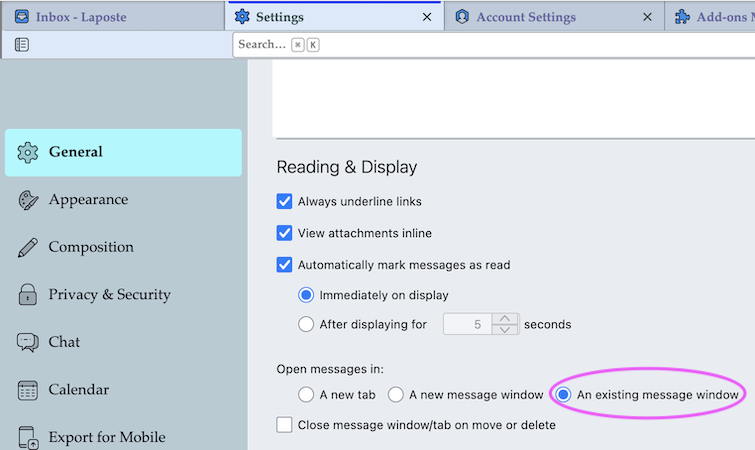
I presume that you open messages in a tab or a new window and not read them in the message pane (F8). If you read emails in the message pane you wouldn't need to "close the original message"; you would just select another message in the thread pane and read it in the message pane. I think that you will continue reading messages in a tab or new window. There is a setting which allows to open a new message in the same message window, so you won't need to close it each time: go to Settings > General > Reading & Display > Open messages in: activate the radio button ⦿ An existing message window
Otherwise you can also submit your ideas and enhancement proposals on this site https://connect.mozilla.org/