


Disordered subfolder files

Hi
I'm using Thunderbird 140.5 on a desktop Mac running Sequoia 15.7.2
In Local Folders, my subfolders have subfolders. In both levels of subfolders, Thunderbird has spontaneously started disordering both newly created subfolders, and folders which I move from one subfolder to another using right click 'Move To'
Up until ten days ago, all folders whether new or moved, were listed alphabetically. Now, day by day, the disordering is getting worse and as someone with ongoing conversations with hundreds of clients, it is becoming impossible to work when I have to give so much time to slowly scanning through every folder looking for the relevant subfolder.
I don't know why I can't update this version, but I tried installing the newest version available (145) and used the 'reset folder option' which did not work either.
Also, setting up a whole new account instead of upgrading my existing account is a colossal faff and I'd rather not have to!
Aside from manually reordering (also a colossal faff), can anyone suggest something I might be missing in stopping this happening?
Thunderbird says I'm on an esr channel, if that helps
Thanks
Alle antwurden (8)

There's a bug for that which has been fixed, but it hasn't been back-ported to 140esr yet. For now, manual ordering is that way, unless you want to update to the release version.
Hi Ed. Thanks for the reply. Which release version? We tried installing version 145 but the problem persisted. Was that not the correct version?
Adele Banks said
Hi Ed. Thanks for the reply. Which release version? We tried installing version 145 but the problem persisted. Was that not the correct version?
Yeah, 145. Did you try 'Reset Folder Order'? That's what hasn't been back-ported yet.
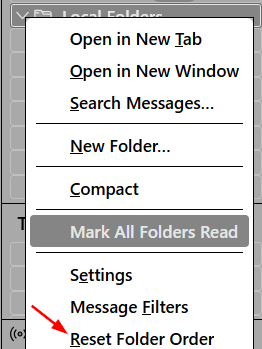
Yes - that's the point I've been trying to make :) We installed a clean version of Thunderbird - version 145 - and tried 'reset folder order' and it did not work. The files were still disordered. This is why I'm still asking for help, because the go-to response everywhere online is just update Thunderbird and run 'rest folder order' but I've done that and it did not work.
Adele Banks said
Yes - that's the point I've been trying to make :) We installed a clean version of Thunderbird - version 145 - and tried 'reset folder order' and it did not work. The files were still disordered. This is why I'm still asking for help, because the go-to response everywhere online is just update Thunderbird and run 'rest folder order' but I've done that and it did not work.
Hmm, maybe https://bugzilla.mozilla.org/show_bug.cgi?id=1979880. It's fixed, but may be a while before it lands.

I am running TB v150.0.1 and one of my large folders is now somewhat out of alphabetical sort order. I do NOT have the 'Reset Folder Order' choice in the drop down menu for that folder. How can I get that option?
Bewurke troch JoeRLuciano op
JoeRLuciano said
I am running TB v150.0.1 and one of my large folders is now somewhat out of alphabetical sort order. I do NOT have the 'Reset Folder Order' choice in the drop down menu for that folder. How can I get that option?
That option appears only when you r.-click the account; it's not for individual folders.
ETA: r.-click the account or Local Folders
Bewurke troch Ed op
Thanks for the clarification. I clicked on "Local Folders" (where the subfolders were out of order) and the option appeared in the drop down and clicking on it fixed the issue. Thanks again.