


Windows 10 reached EOS (end of support) on October 14, 2025. If you are on Windows 10, see this article.

Sykje yn Support

Mij stipescams. Wy sille jo nea freegje in telefoannûmer te beljen, der in sms nei ta te stjoeren of persoanlike gegevens te dielen. Meld fertochte aktiviteit mei de opsje ‘Misbrûk melde’.

Mear ynfo
Dizze konversaasje is argivearre. Stel in nije fraach as jo help nedich hawwe.
Argivearre

Thunderbird creates spam folder when I already have a junk folder (bug1985372)

Wes

I use Thunderbird desktop to access IMAP email from my hosting provider. My hosting provider includes a junk email folder named "Junk" with the path "...hosting.com/INBOX/Junk. I cannot delete this folder.

Whenever I run Thunderbird, it creates a second folder named "Junk" with the path "...hosting.com/INBOX/spam. If I right-click on this folder and delete it, it is re-created the next time I start Thunderbird. I have gone into "Junk Settings" unchecked the "Move new junk message to..." checkbox thinking that this is causing Thunderbird to mistakenly create an extra junk/spam folder but it continues to create that extra junk folder.

How do I stop this from happening? I should only require one junk/spam folder.
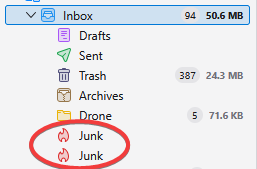
I use Thunderbird desktop to access IMAP email from my hosting provider. My hosting provider includes a junk email folder named "Junk" with the path "...hosting.com/INBOX/Junk. I cannot delete this folder. Whenever I run Thunderbird, it creates a second folder named "Junk" with the path "...hosting.com/INBOX/spam. If I right-click on this folder and delete it, it is re-created the next time I start Thunderbird. I have gone into "Junk Settings" unchecked the "Move new junk message to..." checkbox thinking that this is causing Thunderbird to mistakenly create an extra junk/spam folder but it continues to create that extra junk folder. How do I stop this from happening? I should only require one junk/spam folder.
Keppele skermôfbyldingen

Bewurke troch Wayne Mery op

Alle antwurden (1)

Please create a bug report at https://bugzilla.mozilla.org/enter_bug.cgi?product=thunderbird with details including your provider/domain name.