


How to override zebra striping for the current selected message

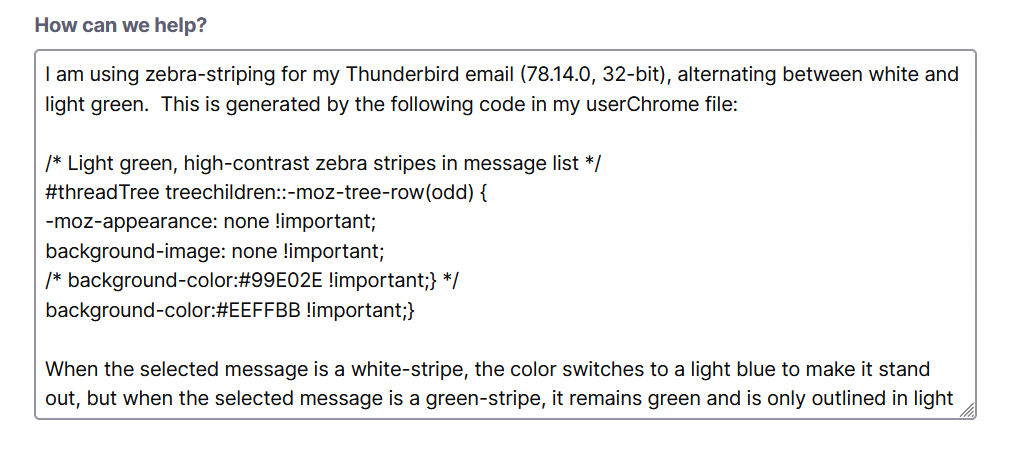
I am using zebra-striping for my Thunderbird email (78.14.0, 32-bit), alternating between white and light green. This is generated by the following code in my userChrome file. (The forum seems to change my code after it's posted, but the attached screenshot shows the actual code):
/* Light green, high-contrast zebra stripes in message list */
- threadTree treechildren::-moz-tree-row(odd) {
-moz-appearance: none !important; background-image: none !important; /* background-color:#99E02E !important;} */ background-color:#EEFFBB !important;}
When the selected message is a white-stripe, the color switches to a light blue to make it stand out, but when the selected message is a green-stripe, it remains green and is only outlined in light blue, which makes the selected message difficult to identify.
How can I override the zebra-striping for *any* selected message (white or green stripe), such that the message is always light blue?
Bewurke troch kmcguire2 op
Alle antwurden (2)
Keazen oplossing
re : 78.14.0 You really are using an outdated version :) - any particular reason for this?
Currently - selected message is a white-stripe, the color switches to a light blue selected message is a green-stripe, it remains green and is only outlined in light blue
That sounds like you have other code working - 'outlined' - do you mean the text itself has an outline like a shadow? An image of your problem would help explain issue.
The code only effects the background for 'odd' rows. Using #99E02E is a strong green background colour. Using #EEFFBB is a weaker pale green background colour.
Maybe you prefer a black or dark strong colour as an easy read which would work for any lighter background and bold blue to help identify new or unread mail.
I'm not sure what code you have for the actual cell text for unread, read, selected But try the following for setting unread and selected. Obviously you will have to adjust colour to suit.
/* for unread emails in either odd or even rows - colour of text in cell is #2492d1 = blue and bold*/
#threadTree treechildren::-moz-tree-cell-text(unread) {
-moz-appearance: none !important;
color: #2492d1 !important;
font-weight: bold !important;
}

/* for 'selected' emails in either odd or even rows - colour of text in cell is #181818 = very dark grey */
#threadTree treechildren::-moz-tree-cell-text(selected) {
-moz-appearance: none !important;
color: #181818 !important;
}
Bewurke troch Toad-Hall op
Many thanks for your assistance!
(Yes, I need to upgrade! FWIW, I run the current version at my office...)