Contacts issue++

When I highlight a contact and click "Add to to", nothing happens. Only "collected addresses" will populate the address box. Works fine on my desktop, but not on my laptop. Thanks for your help!!
Alle antwurden (5)
Does you laptop have a Apple operating system and use the Apple address book. It is read only.
No. Operating system Windows 11.
re :When I highlight a contact and click "Add to to",
I presume you have clicked on 'New Message' button and are wanting to compose an email. The comment relates to the 'Contacts Sidebar'.
When you select a contact from the list in the Contact side bar - are the buttons eg: 'Add to to' enabled or not ?
re : Only "collected addresses" will populate the address box.
On laptop - where did you get the Thunderbird installation ? Microsoft App Store or via the official website : https://www.thunderbird.net/en-US/thunderbird/all/
I'm wondering if all your profiles - maybe copied over from desktop to laptop were put in the default location used if you downloaded from Thunderbird website, but if you used Microsoft app store then they stick the profile in a completely different location, so it's got all the Collected but cannot see anything in other address books.
Normally uninstalling does not solve anything, but in this case, if you used the Microsoft app store to install Thunderbird and you copied all your data into the default location for a normal Thunderbird install then I would say uninstall and then reinstall same version as used on desktop. Make sure to check whether you used ESR on desktop and then make sure to select the channel for 'Thunderbird Extended Support Release' to get download.
Try uninstall Thunderbird and get a fresh download from the offical website which should install and pick up the profile you copied and set up in the default location eg: C://Users/username/Appdata/Thunderbird.....
Hey, thanks for the info on how to resolve my issue. I have downloaded the installer, so will get started on the installation shortly. After that's done, should I do an export to a zip drive from my desktop to get all the fresh contact info to my laptop. That seems to be the easiest solution. Thanks, John
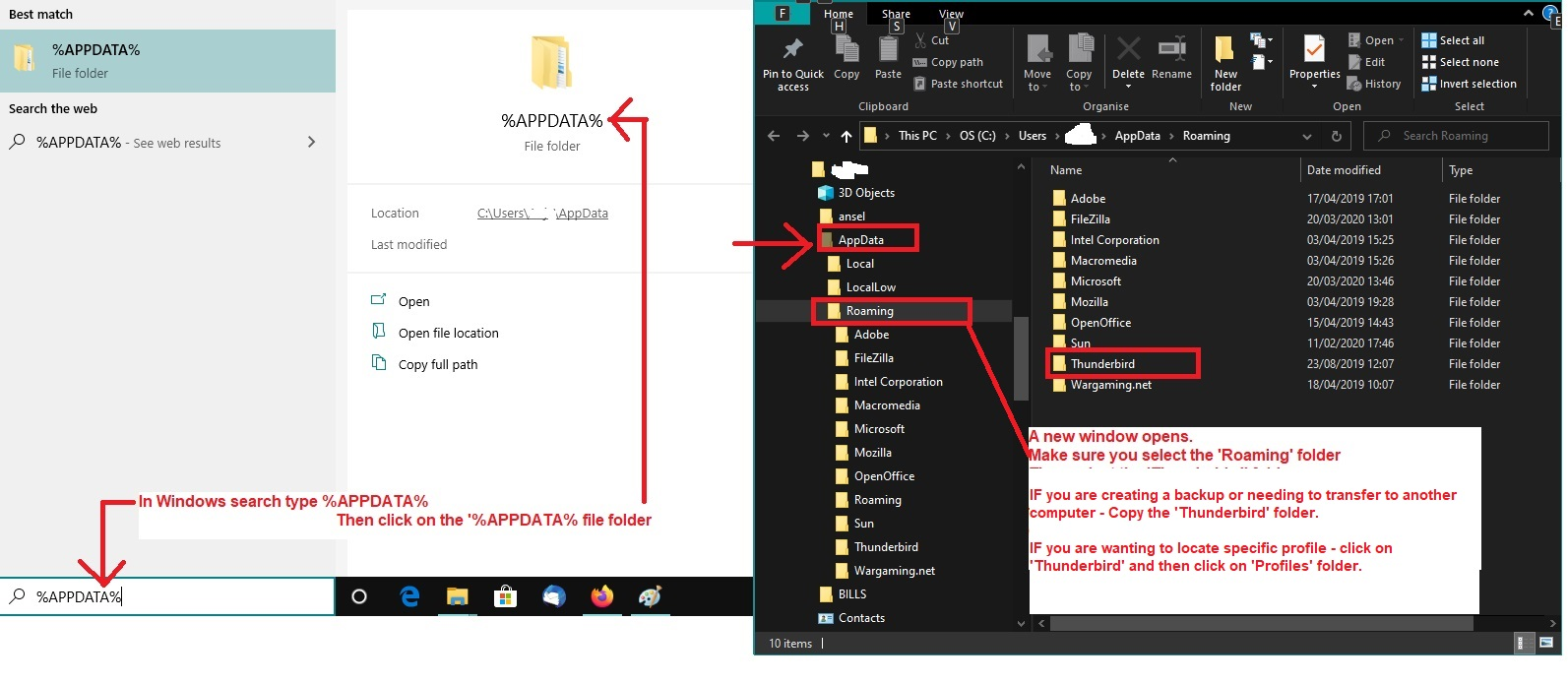
Assuming you want exactly the same on both desktop and laptop. Assuming same version on both computers and using same default location for profile. Image included as a guide.
On desktop:
- Exit Thunderbird if running
- In Windows search type: %Appdata%
- Select %Appdata% File folder
- Select 'Roaming' folder
- Copy the 'Thunderbird' folder to external device - it contains everything.
On laptop: It will have the new installed Thunderbird - same version as on Desktop.
- Exit Thunderbird if running
- In Windows search type: %Appdata%
- Select %Appdata% File folder
- Select 'Roaming' folder
- Delete the default 'Thunderbird' folder
- Paste the copied 'Thunderbird' folder from external device into the 'Roaming' folder.
Start Thunderbird - you should see identical of everything that is on desktop.