


Bugged download - I can't cancel it at all and it wont download

I have restarted Firefox to no avail. I wish not to uninstall and re-install as I have several important bookmarks I don't want to get rid off.
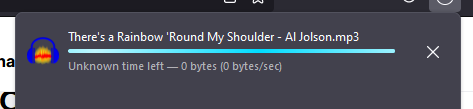
This one download keeps persisting. When I click the x, nothing happens. When I try to cancel it, nothing happens. It doesn't make any progress and doesn't do anything else aside from prevent me from downloading other files. It is really beginning to stress me out.
Please help.
I have restarted Firefox to no avail.
I wish not to uninstall and re-install as I have several important bookmarks I don't want to get rid off.
This one download keeps persisting. When I click the x, nothing happens. When I try to cancel it, nothing happens. It doesn't make any progress and doesn't do anything else aside from prevent me from downloading other files. It is really beginning to stress me out.
Please help.
Alle antwurden (4)
Try right-click > Clear Preview Panel.
The problem STILL persists, none of your replies have solved it.
What about right-click > Delete?
Do any errors appear in the Browser Console (Ctrl+Shift+J) when you try to remove it?