


Windows 10 reached EOS (end of support) on October 14, 2025. If you are on Windows 10, see this article.

Sykje yn Support

Mij stipescams. Wy sille jo nea freegje in telefoannûmer te beljen, der in sms nei ta te stjoeren of persoanlike gegevens te dielen. Meld fertochte aktiviteit mei de opsje ‘Misbrûk melde’.

Mear ynfo
Dizze konversaasje is argivearre. Stel in nije fraach as jo help nedich hawwe.
Argivearre

Outlook organisational email fails to retrieve any emails or folders

hciczx

I am trying to log into my organisation's Outlook email with Thunderbird, but I have been unable to do so. It keeps throwing errors whenever I try to click on the "Inbox" folder for that email. Clicking Get Messages just prompts me for my password, and after signing in, Thunderbird shows the "User is authenticated but not connected" error message.

Things I've tried: Using normal password: setting up the email normally using IMAP seems to go smoothly until I try to view my emails. Then, Thunderbird throws one of the three errors shown in the image attached. Using OAuth2: I changed both the Security Settings under Account Settings -> Server Settings and the Authentication method under Account Settings -> Click Edit on Office365 (Microsoft) - smtp.office365.com -> Authentication method to OAuth2. The very first time I did this, another Thunderbird window opened with my organisation's sign in page. I signed in, but nothing happened and Thunderbird still threw one of the three errors in the image attached. After the first time, the sign in page never seems to pop up anymore. Setting up app password: organisation does not allow setting up of app passwords via the Office 365 portal.

My server settings and SMTP server settings are also shown in the image attached.
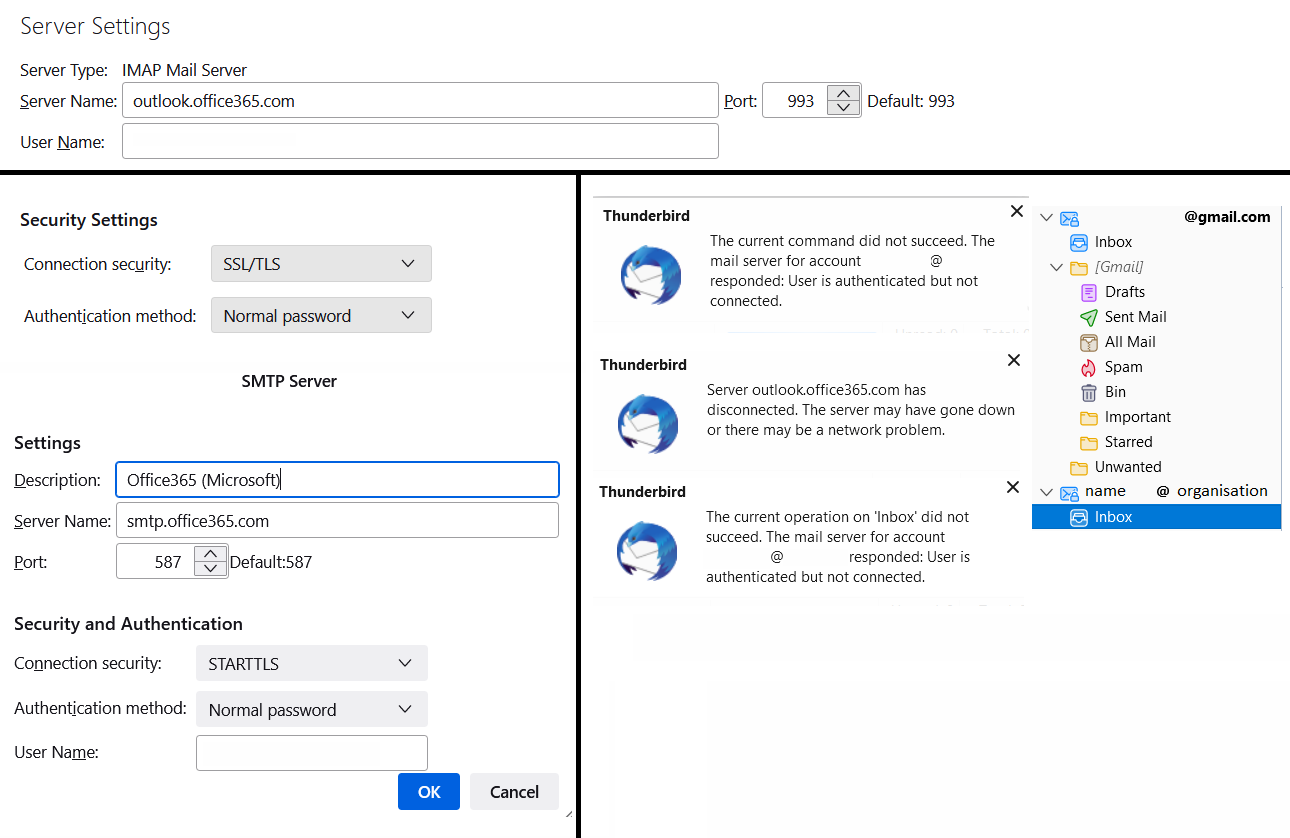
I am trying to log into my organisation's Outlook email with Thunderbird, but I have been unable to do so. It keeps throwing errors whenever I try to click on the "Inbox" folder for that email. Clicking Get Messages just prompts me for my password, and after signing in, Thunderbird shows the "User is authenticated but not connected" error message. Things I've tried: Using normal password: setting up the email normally using IMAP seems to go smoothly until I try to view my emails. Then, Thunderbird throws one of the three errors shown in the image attached. Using OAuth2: I changed both the Security Settings under Account Settings -> Server Settings and the Authentication method under Account Settings -> Click Edit on Office365 (Microsoft) - smtp.office365.com -> Authentication method to OAuth2. The very first time I did this, another Thunderbird window opened with my organisation's sign in page. I signed in, but nothing happened and Thunderbird still threw one of the three errors in the image attached. After the first time, the sign in page never seems to pop up anymore. Setting up app password: organisation does not allow setting up of app passwords via the Office 365 portal. My server settings and SMTP server settings are also shown in the image attached.
Keppele skermôfbyldingen

Alle antwurden (1)

You should check with corporate IT what the correct settings are.